Creating Custom 3D Avatars with Runek
Published on October 21, 2026. · 13 min read
A person is a seed and a few props. No
.glb, no textures, no rig to import. Everything else falls out of that.
Every game with a character creator ends up with the same pile of stuff. A base mesh, a skeleton, a few hundred blend shapes, a texture atlas per outfit, and a pipeline to keep all of it in sync. Then you ship it, and someone wants a hat.
Runek doesn’t have that pile. If you haven’t seen it before: it’s a source registry of procedural 3D components for React Three Fiber. You pull a component’s source into your project with npx @runek/cli add, and every component builds its geometry from props and a seed. I wrote about the physics side of it in World-building with WASM.
The component I’ve spent the most time on is Person. It’s a sculpted, clothed, skinned figure, built in the browser from nothing but props. So the question I kept getting was: can people customise it?
Yes. Every part of it. This post walks through how, from one line of JSX to a character creator that saves the player’s look and walks it around a world. Everything below was rendered from Runek v0.15.0 while writing it.
Setup
You need a React Three Fiber project. Then:
add copies the source into src/runek/ and installs what it needs, including @runek/core, the small runtime that gives you <World>. person also pulls in the two components it depends on (interactable and sign), so you don’t have to track that.
A seed is a person
The smallest possible avatar:
import { World } from '@runek/core'
import { Floor } from './runek/Floor'
import { Person } from './runek/Person'

export function App() {
  return (
    <World>
      <Floor size={[10, 10]} />
      <Person seed={41} />
    </World>
  )
}
That’s a whole person. Skin tone, hair, build, face, clothes and colours, all rolled from 41. Change the number and you get someone else:
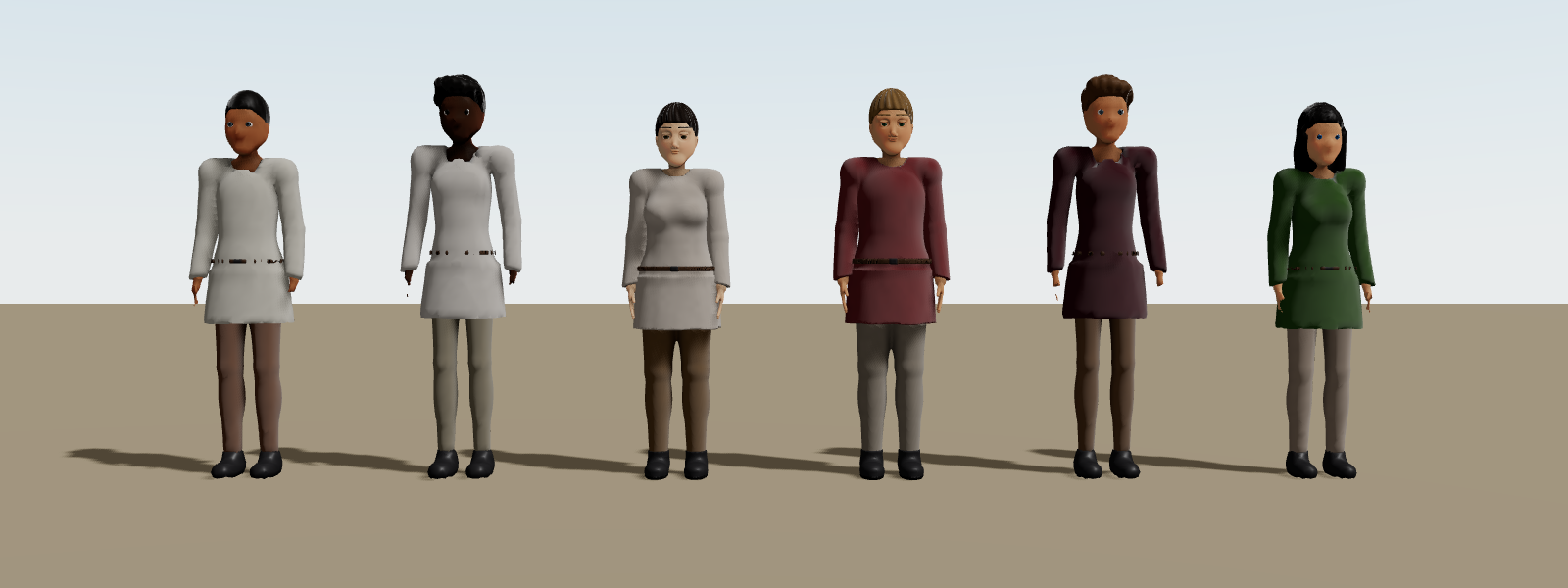 Seeds 1 to 6. Nothing else set.
And because the seed is the only source of randomness, 41 is the same person on every machine, forever. It isn’t a randomiser. It’s an address. Commit the number and you’ve committed the person.
That’s the whole trick behind customisation too. Every trait you don’t set comes from the seed. Every trait you do set wins. So customising a person is never “edit the mesh”. It’s “write a prop”.
How a look is decided
There are four places a trait can come from, and they stack in a fixed order:
- A prop you set (
topColor,hair,face, …) - The
skin, a cosmetic bundle (more on this below) - The
kind, a role preset likeguardorfarmer - The seed
The first one that has an answer wins. You don’t have to guess which one did, either. resolvePerson tells you, trait by trait, without building any geometry:
import { resolvePerson } from './runek/Person'

resolvePerson({ seed: 41, kind: 'guard', skin: 'winter', topColor: '#b03a2e' })
// kind:        { value: 'guard',   from: 'prop' }
// outfit:      { value: 'coat',    from: 'skin' }
// topColor:    { value: '#b03a2e', from: 'prop' }
// hat:         { value: 'hood',    from: 'skin' }
// hair:        { value: 'ponytail', from: 'seed' }
// accessories: { value: ['scarf', 'belt'], from: 'skin' }
That from field is going to be useful later, when we build a UI that needs to show what the seed picked.
The body and the style
style is the biggest single switch. It changes proportions and the face template together:
stylized(the default): an animated-film look. Bigger head and eyes, small features, slender limbs.realistic: canonical human proportions.anime: pushes the eyes and legs further and sharpens the chin.
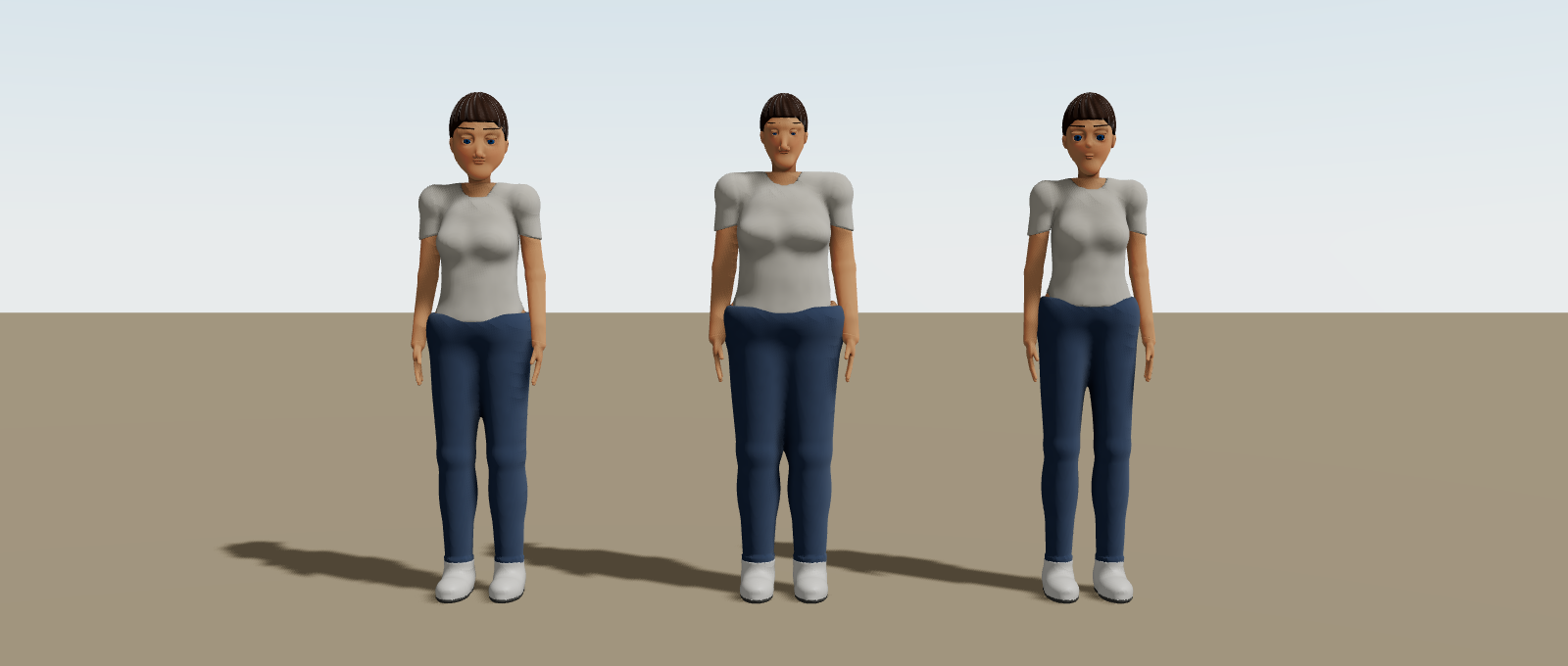 Same seed, same clothes. Only
 style changes.
The rest of the body lives in one object:
<Person
  seed={41}
  style="realistic"
  gender="masculine"
  age="elder"
  body={{ build: 'stocky', tone: '#a9714a', height: 1.72 }}
/>
gender is silhouette cues only: shoulder-to-hip ratio, jaw, brow, and which hairstyles the seed leans towards. Every trait it nudges is still yours to override. age changes the head-to-body ratio and stature, and an elder gets a slightly stooped spine.
The face, part by part
The face is a part object too. Sizes are multipliers around 1:
<Person
seed={41}
face={{
eyes: { color: '#3b7a57', size: 1.25 },
brows: { weight: 1.6 },
nose: 'broad',
lips: { fullness: 1.3 },
blush: 0.6,
}}
/>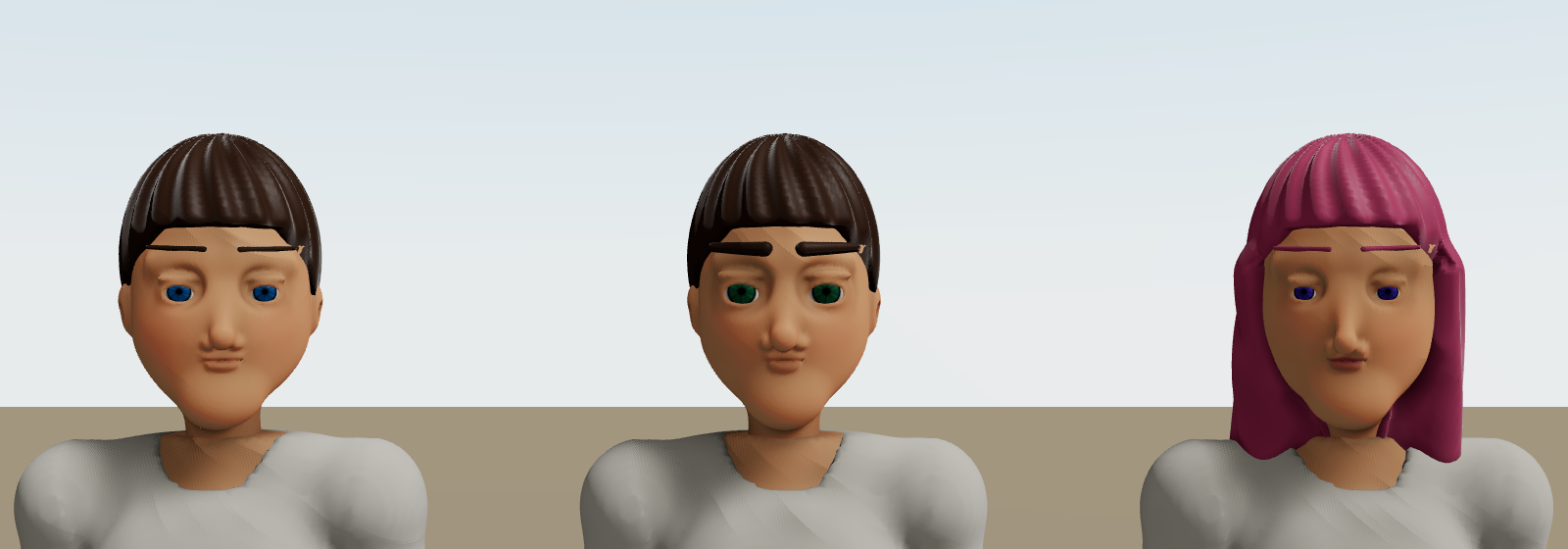 Left: the seed. Middle: the face object above. Right: a different face object with
 hair={{ style: 'long', color: '#c2577a' }}.
Brow colour follows the hair colour unless you set it. facialHair (none, stubble, moustache, beard) and hair (8 styles, any colour) sit next to it as their own props.
Clothes are a stack
This is my favourite part. Clothes aren’t a fixed list of outfits. They’re layers, listed inner to outer, and the order decides the fit:
// Tucked in: the shirt is listed before the jeans
<Person
  seed={41}
  clothes={[
    { type: 'shirt', neck: 'collar', sleeves: 'long', color: '#e9edf1' },
    { type: 'jeans', color: '#45576a' },
    { type: 'belt', color: '#5a3522' },
    { type: 'shoes', color: '#9a5236' },
  ]}
/>
Swap the first two lines and the shirt hangs over the jeans instead. Add a blazer at the end and it goes over everything:
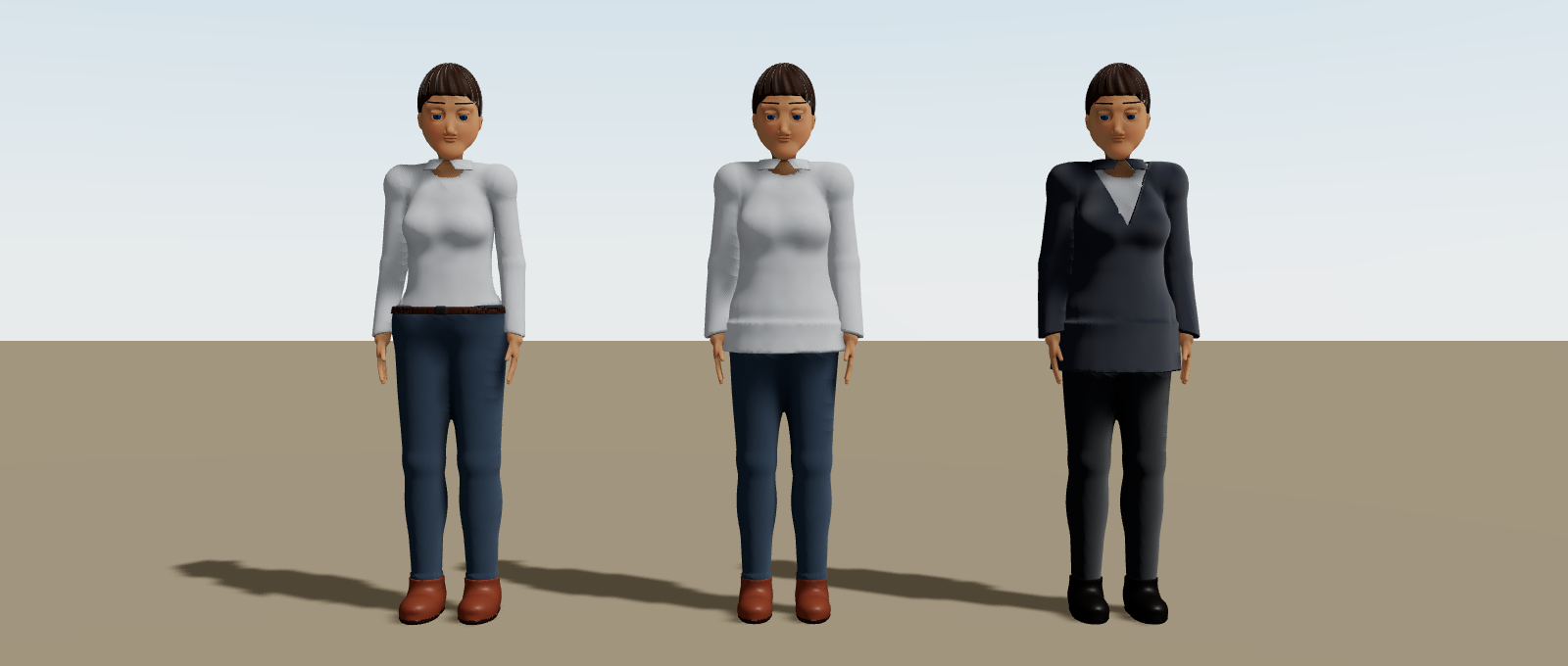 Same four garments, different order. Then a blazer on top.
There are 20 garment types, from tshirt and hoodie to skirt, boots, scarf and cape. Tops take sleeves and neck, and everything takes a length from 0 to 1 (a hem, a trouser leg, a boot’s drop).
If you don’t want to think in layers, outfit is the one-word shorthand. outfit="tunic" expands to trousers, a tunic and shoes, and topColor, bottomColor and shoeColor recolour it.
Skins: a whole look in one prop
Then there’s skin. It’s a skin in the game sense: a cosmetic loadout. Clothes, colours, headwear and accessories, bundled as one plain JSON object.
<Person seed={41} skin="winter" />Runek ships with a few: casual, office, hoodie, winter, pirate, chef, voyage, festival and more. Or pass your own object, or spread one of the presets from PERSON_SKINS and tweak it.
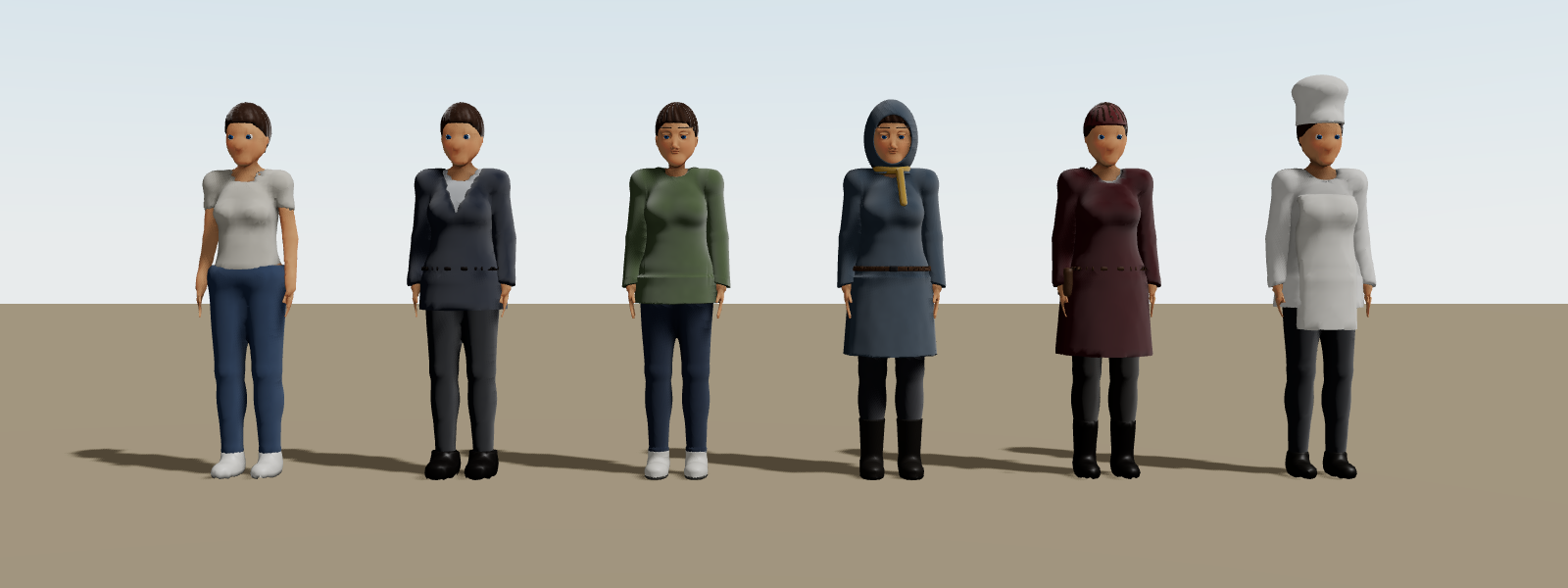 One seed, six skins. Same face, same hair, every time.
The important detail: a skin never touches the body. No skin tone, no build, no hair. So swapping a skin is swapping clothes, not swapping people. Your character stays your character.
And since it’s one prop, a wardrobe in your game is a single state write. That’s what makes the next part easy.
Or just use the studio
Before writing any UI, it’s worth knowing there’s already one. The Runek workshop has an avatar studio: press 4, or select a Person and hit customize, and it stands on a turntable under good light.
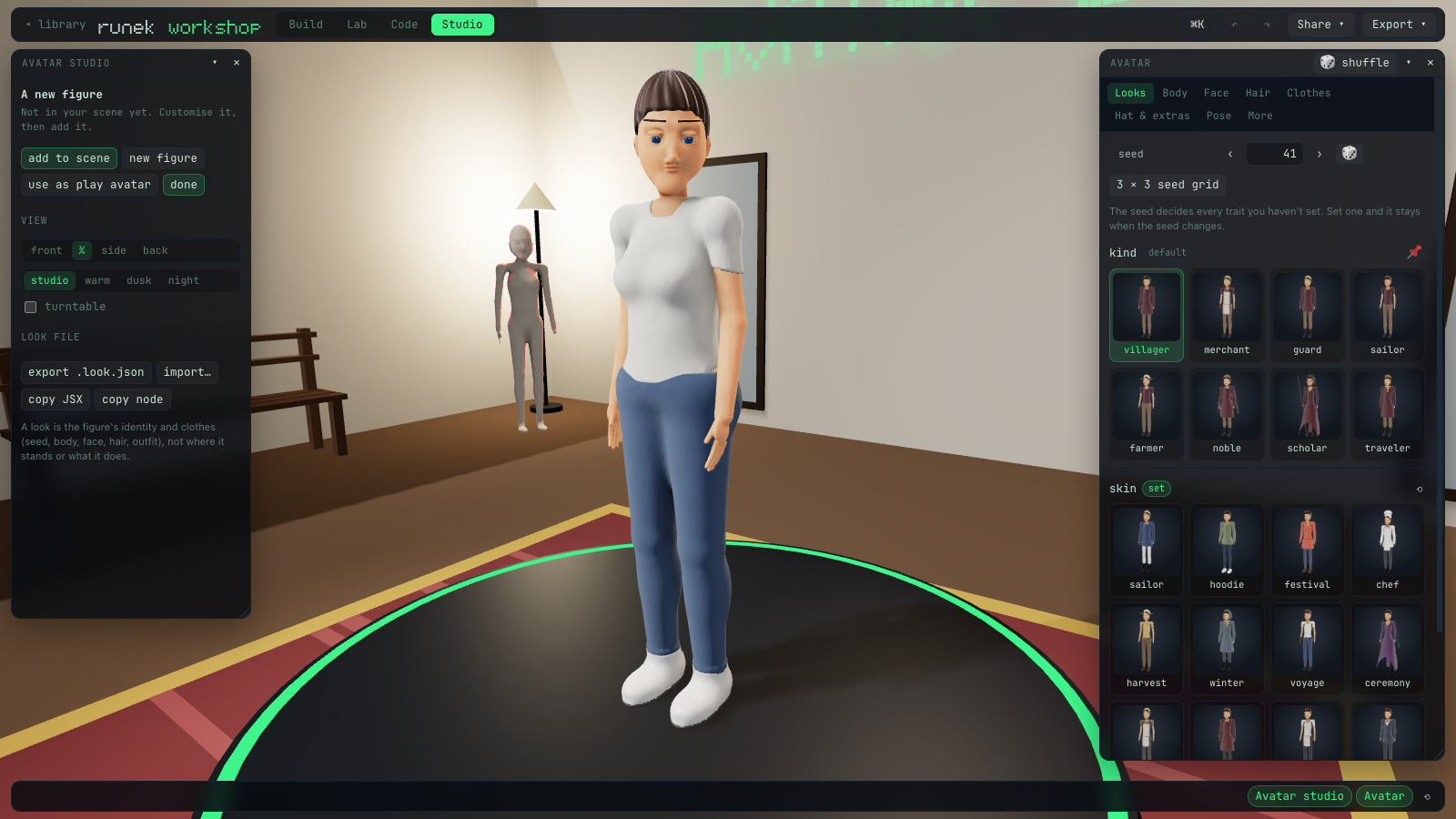
The Avatar panel has a tab for each part of the figure (Looks, Body, Face, Hair, Clothes, Hat & extras, Pose), and the camera moves to frame whatever you’re editing.
Not sure which seed you want? The 3 × 3 seed grid shows the neighbouring seeds side by side. Click one and you’ve picked your base:
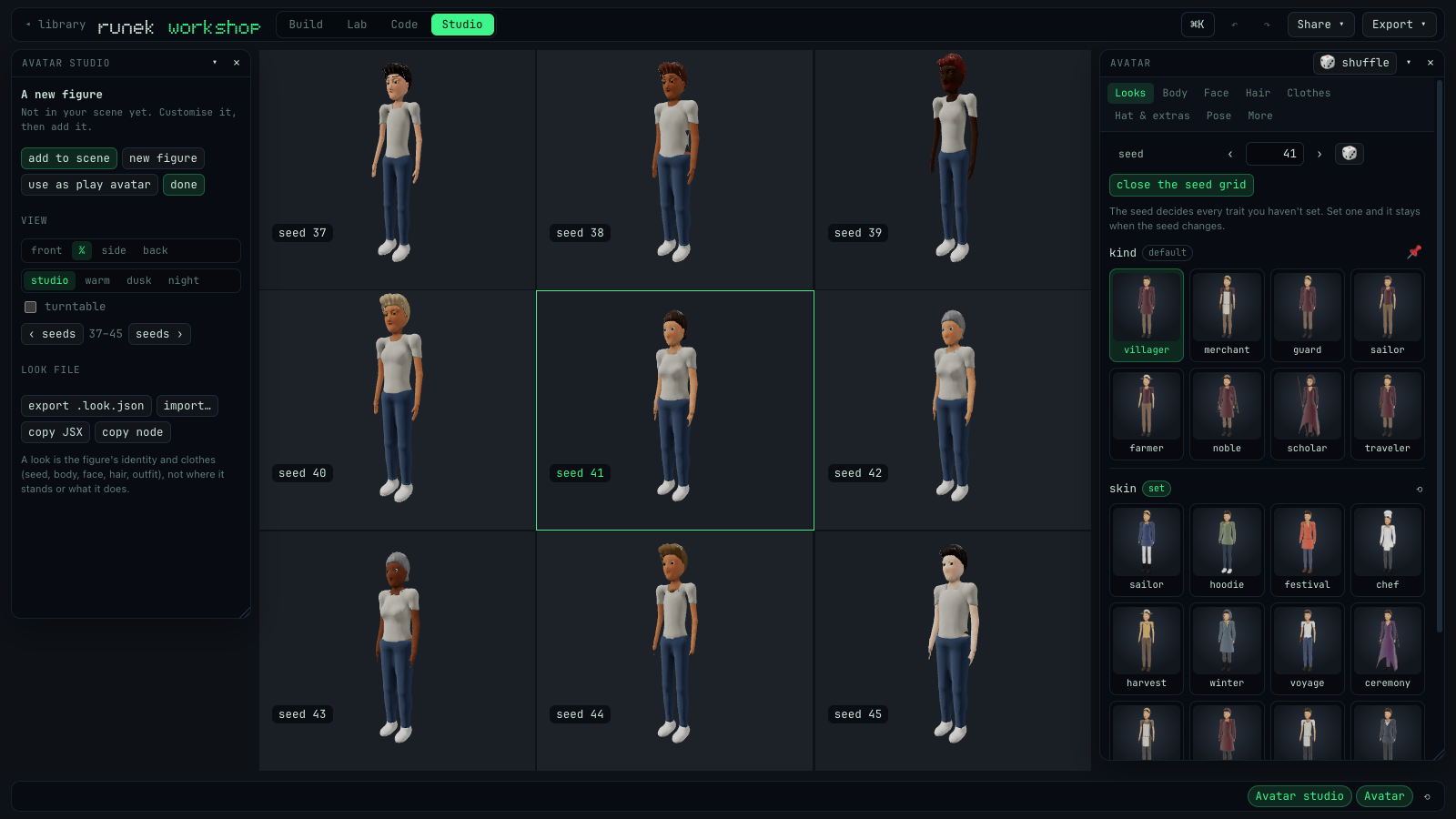
Every trait shows where its value came from, the same from that resolvePerson reports: set, skin, kind, seeded or default. ⟲ clears what you set, so the seed decides again. 📌 pins what the seed chose, so it stays when you change the seed.
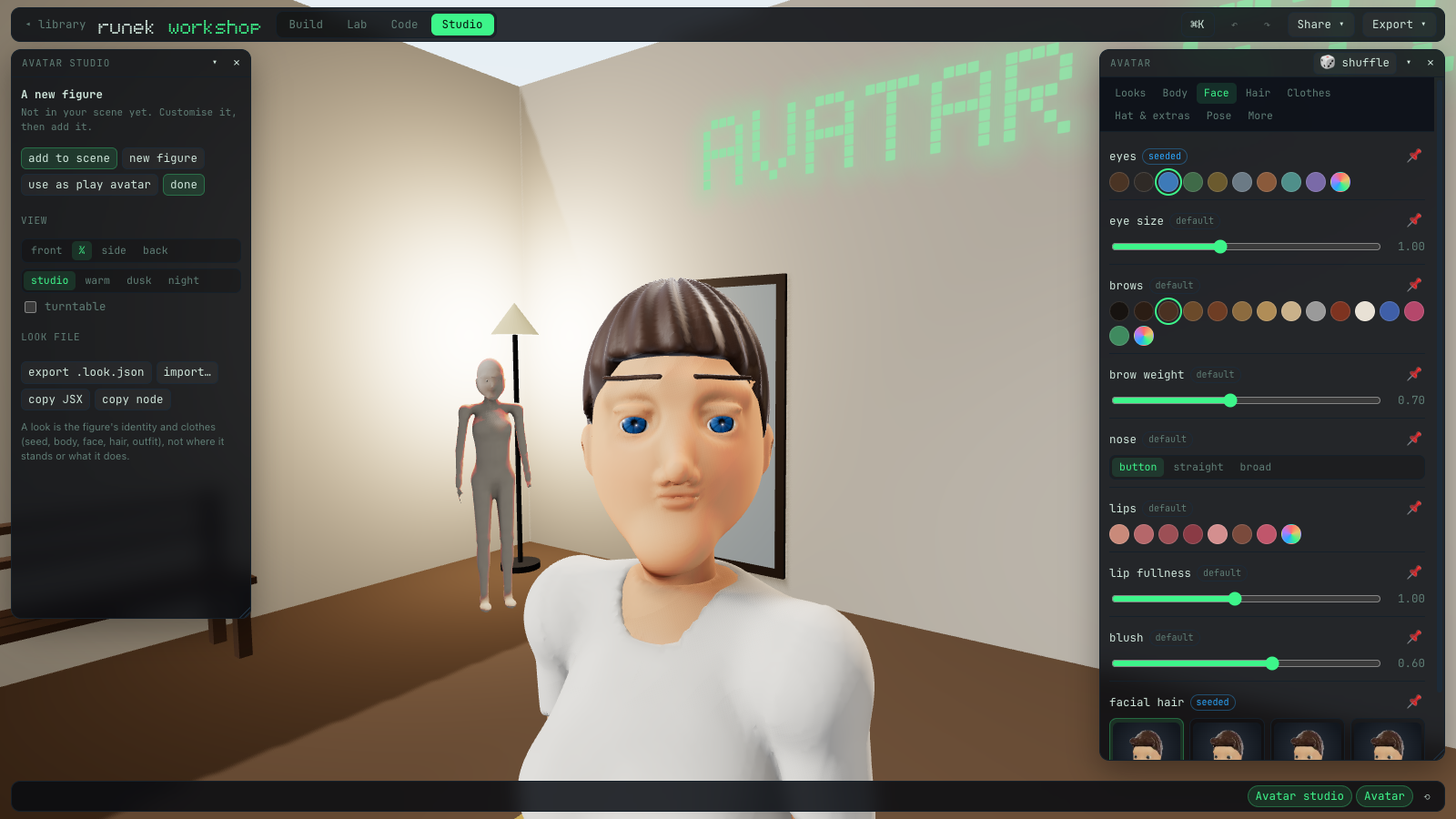
The Clothes tab is where the layer stack lives. Drag to reorder, open a layer for its colour, sleeves, neckline and length. It even tells you which layers are tucked:
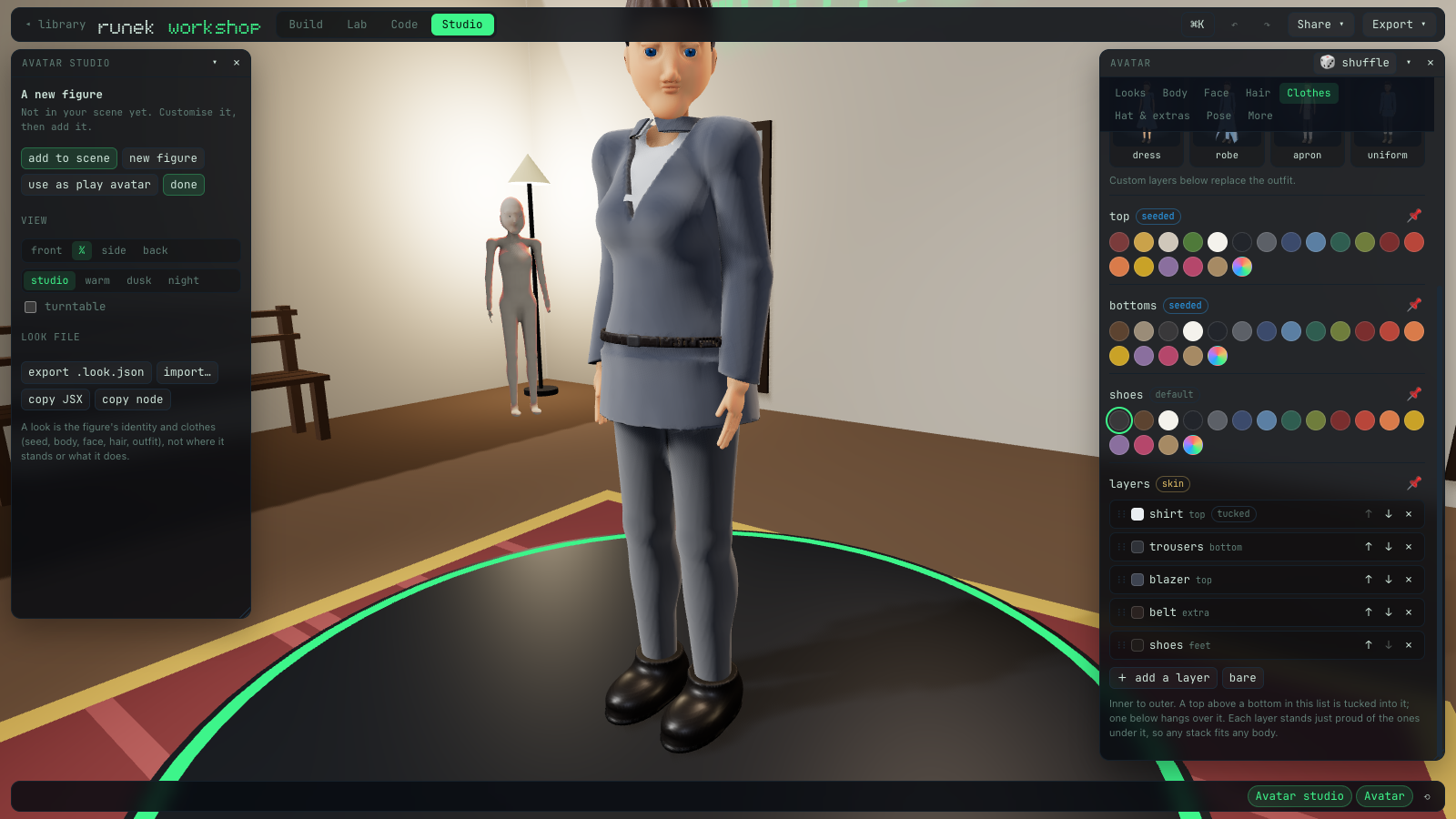
When you’re happy, export .look.json downloads the look as a Person node: who the figure is and what it wears, not where it stands. It pastes straight into a world file. use as play avatar puts the same look on the world’s Player.
The studio is great for authoring your NPCs. But it lives on the docs site, not in the registry. If you want your players to dress up inside your game, you build that bit yourself. Which, it turns out, is about a hundred lines.
Building your own character creator
Here’s what we’re making:
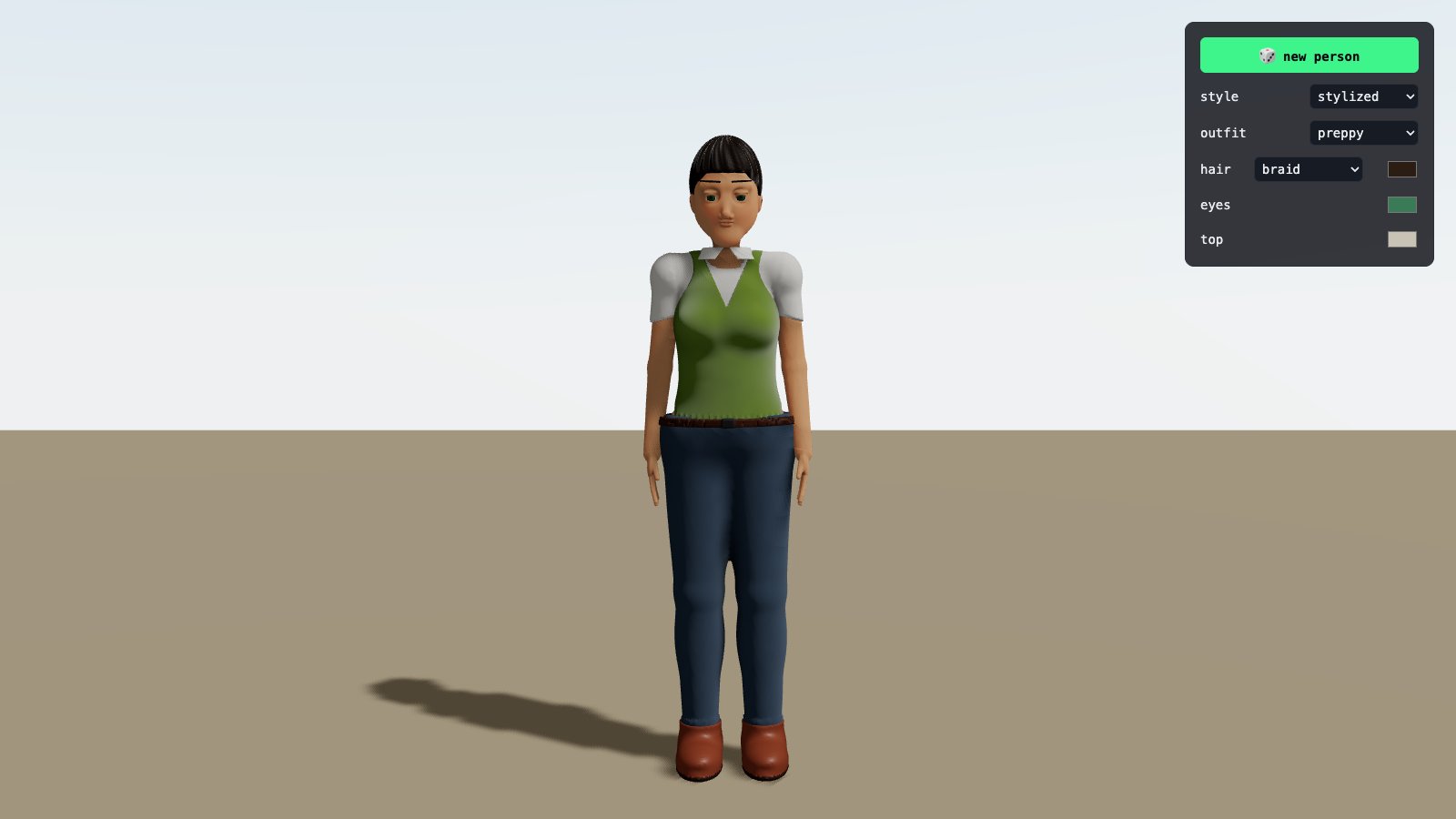
A figure, a panel, and the look saved in the browser so it’s still there next time.
The look
First, decide what a player is allowed to change. This is just a type, plus loading and saving it:
// src/look.ts
import type { PersonFaceSpec, PersonHairSpec, PersonSkinName, PersonStyle } from './runek/Person'

export interface Look {
  seed: number
  style: PersonStyle
  skin: PersonSkinName
  hair: PersonHairSpec
  face: PersonFaceSpec
  topColor?: string
}

export const DEFAULT_LOOK: Look = { seed: 41, style: 'stylized', skin: 'casual', hair: {}, face: {} }

const KEY = 'my-world:look'

export function loadLook(): Look {
  try {
    const saved = localStorage.getItem(KEY)
    if (saved) return { ...DEFAULT_LOOK, ...JSON.parse(saved) }
  } catch {}
  return DEFAULT_LOOK
}

export function saveLook(look: Look) {
  try {
    localStorage.setItem(KEY, JSON.stringify(look))
  } catch {}
}
Notice there’s nothing 3D in here. A look is plain JSON. That’s the whole point. It fits in localStorage, a URL, a save file, or a row in your database if you have one. The try/catch is there because storage can throw in private windows. When it does, you get the default look instead of a crash.
The creator
// src/AvatarCreator.tsx
import { OrbitControls, PerspectiveCamera } from '@react-three/drei'
import { World } from '@runek/core'
import { useEffect, useState } from 'react'
import { type Look, loadLook, saveLook } from './look'
import { Floor } from './runek/Floor'
import {
  PERSON_SKINS,
  Person,
  type PersonHair,
  type PersonSkinName,
  type PersonStyle,
  resolvePerson,
} from './runek/Person'
import { Sky } from './runek/Sky'

const STYLES: PersonStyle[] = ['stylized', 'realistic', 'anime']
const HAIRS: PersonHair[] = ['short', 'swept', 'long', 'bun', 'ponytail', 'braid', 'cropped', 'bald']
const SKINS = Object.keys(PERSON_SKINS) as PersonSkinName[]

export function AvatarCreator() {
  const [look, setLook] = useState<Look>(loadLook)
  useEffect(() => saveLook(look), [look])

  const edit = (patch: Partial<Look>) => setLook((l) => ({ ...l, ...patch }))
  const seen = resolvePerson(look)

  return (
    <div className="creator">
      <World time="10:00">
        <PerspectiveCamera makeDefault position={[0, 1.2, 3.4]} fov={35} />
        <OrbitControls target={[0, 0.95, 0]} enablePan={false} />
        <Sky />
        <Floor size={[20, 20]} />
        <Person {...look} idle lookAt />
      </World>

      <aside className="panel">
        <button type="button" onClick={() => edit({ seed: 1 + Math.floor(Math.random() * 9999) })}>
          🎲 new person
        </button>

        <label>
          style
          <select value={look.style} onChange={(e) => edit({ style: e.target.value as PersonStyle })}>
            {STYLES.map((s) => <option key={s}>{s}</option>)}
          </select>
        </label>

        <label>
          outfit
          <select
            value={look.skin}
            onChange={(e) => edit({ skin: e.target.value as PersonSkinName, topColor: undefined })}
          >
            {SKINS.map((s) => <option key={s}>{s}</option>)}
          </select>
        </label>

        <label>
          hair
          <select
            value={seen.hair.value}
            onChange={(e) => edit({ hair: { ...look.hair, style: e.target.value as PersonHair } })}
          >
            {HAIRS.map((h) => <option key={h}>{h}</option>)}
          </select>
          <input
            type="color"
            value={seen.hairColor.value}
            onChange={(e) => edit({ hair: { ...look.hair, color: e.target.value } })}
          />
        </label>

        <label>
          eyes
          <input
            type="color"
            value={seen.eyeColor.value}
            onChange={(e) => edit({ face: { ...look.face, eyes: { ...look.face.eyes, color: e.target.value } } })}
          />
        </label>

        <label>
          top
          <input type="color" value={seen.topColor.value} onChange={(e) => edit({ topColor: e.target.value })} />
        </label>
      </aside>
    </div>
  )
}
Give .creator a full-screen size and float .panel over the corner with whatever CSS you like. A few things worth pointing out:
Every control is a prop write. setLook goes in, <Person {...look} /> re-renders. There’s no “apply” step and no mesh to patch. Runek rebuilds the figure from the new props.
resolvePerson fills the controls. A colour picker needs a value, but most of these traits aren’t set yet. The seed picked them. seen.hairColor.value is whatever the seed rolled, so the picker starts on the colour you’re actually looking at, and the moment you touch it, that becomes a prop.
The outfit resets topColor. If a player recoloured their top and then switches skins, they’d expect the new skin’s colours, not their old shirt colour on a new jacket. Props beat skins, so you have to clear it yourself.
lookAt makes it look at you. With no Player around, the figure’s head and eyes follow the camera. It’s a small thing, but dressing up someone who’s looking back at you feels very different from dressing a mannequin.
World time="10:00" pins the sky. Without it, Sky follows the real clock, and your character creator turns into a night scene after sunset.
Wearing it in the world
Now the fun part. Player takes a custom body as its child, so the same look goes straight onto the player:
import { World } from '@runek/core'
import { loadLook } from './look'
import { Floor } from './runek/Floor'
import { Person } from './runek/Person'
import { Player } from './runek/Player'
import { Sky } from './runek/Sky'
export function Game() {
const look = loadLook()
return (
<World avatar="third" time="10:00">
<Sky />
<Floor size={[30, 30]} />
<Player position={[0, 1, 0]}>
<Person {...look} physics={false} lookAt={false} height={1.3} position={[0, -0.65, 0]} />
</Player>
<Person seed={3} skin="harvest" position={[1.6, 0, -2.4]} />
</World>
)
}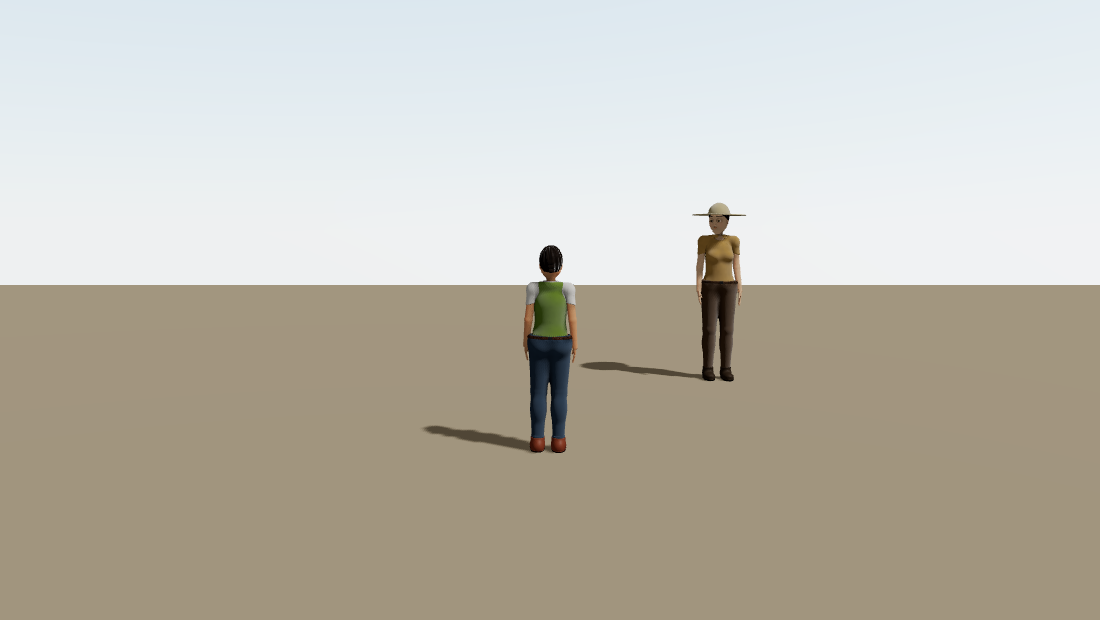 The look from the creator, walking around. WASD moves,
 avatar="third" puts the camera behind it.
The extra props on the body matter:
physics={false}renders the person as a bare visual with noRigidBody. ThePlayeralready owns the physics. Two bodies fighting over one character is not a fun bug.lookAt={false}stops your own avatar from turning its head to stare at… you.height={1.3}fits the figure to the player’s capsule.position={[0, -0.65, 0]}puts its feet at the bottom of the capsule. The capsule itself floats a little off the ground on a spring (that’s how the controller glides up steps), andPlayerlowers the body by exactly that much, so the shoes meet the floor. Until this week it didn’t, and the avatar hovered 26 cm up. I only noticed because the shadow wasn’t touching the shoes.
It walks, too. Person reads the player’s speed, so the walk cycle stays in step with how fast you’re actually moving.
And because a look is data, the whole thing works as a world file as well:
{
  "type": "Player",
  "props": { "position": [0, 1, 0] },
  "children": [
    {
      "type": "Person",
      "props": {
        "seed": 41,
        "skin": "preppy",
        "hair": { "style": "braid", "color": "#2b1d14" },
        "face": { "eyes": { "color": "#3b7a57" } },
        "physics": false,
        "lookAt": false,
        "height": 1.3,
        "position": [0, -0.65, 0]
      }
    }
  ]
}
runek validate checks it, and here’s that exact world in the workshop if you want to poke at it.
Things that bite
The player is a little short
height={1.3} fits the capsule, but a seeded adult is closer to 1.6 or 1.7. Next to your NPCs, your avatar looks like their younger sibling. That’s the capsule’s size, not something the look can fix. Keep it in mind if your world has doorways and counters built for full-size people.
Skins don’t carry hair
This one’s on purpose, but it surprises people. Switch a player from casual to winter and their hair doesn’t change, because skins are wardrobe, not wigs. If you want a “full look” preset that includes hair, keep it in your own Look like the code above does, next to the skin.
What this actually bought
About a hundred lines of React and one type, and players can make a person, keep them, and walk around as them. No model files, no texture atlas, nothing to host but your static site.
The part I’d carry into any character system, Runek or not:
Make the look data, not geometry. Once a whole character is a small JSON object, everything else is ordinary web code. Saving it, sharing it, syncing it, undoing it, diffing it in a pull request. None of that needs to know there’s a 3D mesh at the end.
Let unset mean “the seed decides”. A creator where every field has to be filled in is a form. A creator where you start from a whole person and only change what you care about is a toy. People play with toys.
There’s more in Person than this post touched: poses, emotes, speech bubbles, name tags, patrol routes and interactions. That’s for another post. For now, go make someone.
Links:
- Runek Repo: github.com/nullorder/runek
- Runek Docs: runek.nullorder.org
- The Workshop and avatar studio: runek.nullorder.org/workshop
Personreference: runek.nullorder.org/docs/components/person
