Give Your Agent a Sandbox
Last updated . Published . · 25 min read
An LLM that writes code is only useful if it can run the code. Until it runs, everything the model produced is a guess with good syntax highlighting.
The usual way to close that gap is to give the model your shell. It works, and it is a bad idea in the ordinary way that giving anything your shell is a bad idea. The model does not need your SSH keys, your ~/.aws, your git remotes, or your ability to reach the internet. It needs a place to put three files and run them.
That is what wasmrun agent is: an HTTP server that hands out throwaway WebAssembly sandboxes. Each one gets its own filesystem, its own environment, its own resource limits, and no network at all. When the client is done, the sandbox and everything in it is gone.
This post builds a small coding agent on top of it. We start the server, drive it by hand for ten minutes so the failures are easy to spot later, then write the agent, then watch it fix a failing test suite it has no other way to see. Everything in the shell blocks below was run against a real wasmrun agent v0.22.0 while writing it. Where an output is an example rather than a real capture, it says so.
The shape of the thing
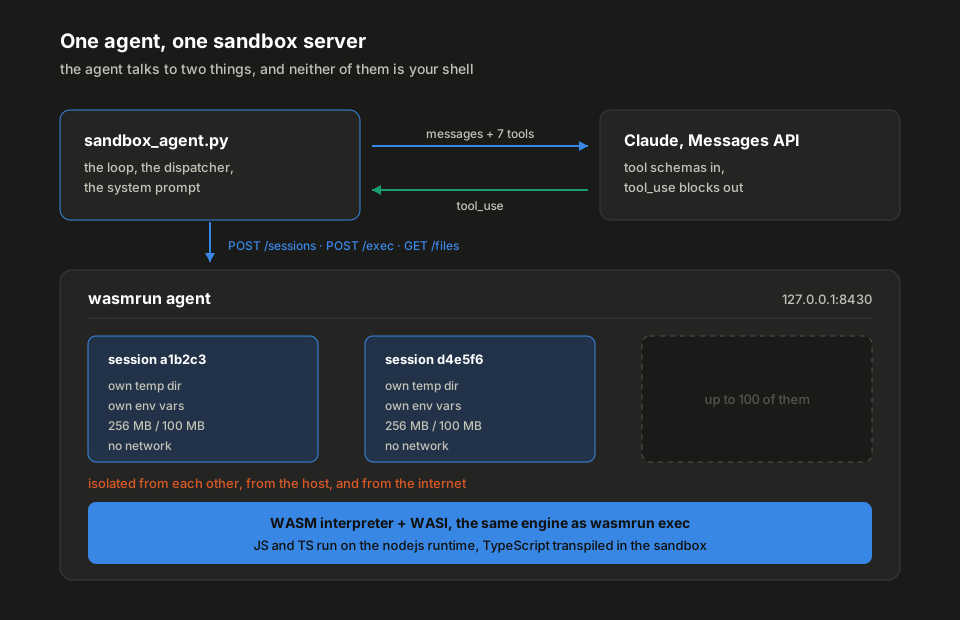
Two conversations, and the agent is the only thing in both of them. It asks Claude what to do next, and it turns whatever comes back into an HTTP request against the sandbox server. Nothing else touches the host.
The nice part is the part you do not write. wasmrun publishes its own tool schemas at GET /api/v1/tools?format=anthropic, already in the exact shape the Messages API wants. The agent fetches seven of them and passes them straight through. There is not a single hand-written tool definition in the whole file.
The task we will give it: write a parseDuration function in TypeScript, with tests, and make the tests pass. The obvious version has a hole in it on purpose, so the model has to read a failing stack trace and come back.
What you need
Plus curl and jq for the next section. Nothing else. There is no Node install, no Docker, no npm binary anywhere in this post. The JavaScript runtime is a .wasm file that wasmrun fetches once and caches under ~/.wasmrun/runtimes/. The first execution on a fresh install pays for that fetch. Later ones do not.
sandbox-agent-demo is the finished version of this post: sandbox_agent.py is the file we write below, tasks/ holds the two demo tasks, and smoke_test.py drives all seven tools without needing an API key. Clone it and follow along, or read on and write the file yourself.

Starting the server and looking around
🤖 Wasmrun Agent Server
   Endpoint:        http://127.0.0.1:8430/api/v1
   Bind:            127.0.0.1 (loopback only), plaintext HTTP
   Max sessions:    100
   Session timeout: 300s
   Memory limit:    256 MB / session
   Fuel limit:      unlimited
   Output limit:    10 MB / session
   File size limit: 50 MB / session
   Disk limit:      100 MB / session
   Max body size:   32 MB / session
   Max concurrent:  100 exec(s)
   Request workers: 116 max
   Shutdown drain:  10s
   npm cache cap:   2048 MB (shared, host-wide)
   Auth:            disabled (open)
   CORS:            restricted
Two lines in that banner are worth reading rather than skimming.
Bind: 127.0.0.1 (loopback only). The exec endpoint runs arbitrary code, so a server anyone can reach is a server anyone can run code on. Binding anywhere else without --auth refuses to start, by design. The last section covers what to do when you actually want it reachable.
Auth: disabled (open). Fine on your laptop, and only there.
The health check needs no auth, so a probe never needs a credential:
{"status":"ok","uptime_seconds":6,"version":"0.22.0"}Now the part the agent cares about. Ask the server what it can do:
create_session  <-
execute_code  <- session_id
write_file  <- session_id, path, content
read_file  <- session_id, path
list_files  <- session_id
list_sessions  <-
destroy_session  <- session_id
Seven tools, each with a full JSON Schema and a description written for a model rather than for a human. ?format=openai returns the same set in the other wire format. This endpoint is the whole reason the agent below is short.
The sandbox by hand
Before wiring a model to it, drive the API yourself once. It is worth ten minutes, because every failure you hit later is easier to spot once you have seen the happy path on its own.
Create a session
deddb0af6cee8bc64fcb4484790fcdf6That created a temp directory on the host and a WASI environment pointed at it. Nothing is running yet.
Run something
{"stdout":"2\n","stderr":"","exit_code":0,"duration_ms":2982}Three seconds. This is the number to plan around, and here is the part that surprised me: repeat runs in the same session are not faster. The JavaScript runtime is instantiated fresh for every execution, and that is what the three seconds buys. Six consecutive execs in one warm session, measured:
duration_ms 3144 3232 3085 3053 3049 3034The work itself is close to free. An empty script and fifty rounds of arithmetic land within 200 ms of each other, so the cost is startup rather than compute:
| Execution | duration_ms |
|---|---|
| empty JavaScript source | 2721, 2921, 2851 |
console.log(1) |
2911, 2829, 2774 |
| fifty rounds of arithmetic | 3038, 2980, 3067 |
shell echo hi |
0, 1, 0 |
The shell is instant because it never touches the WASM runtime at all. It is in-process Rust. Anything that reaches for JavaScript pays the three seconds.
Two things to keep in mind for your own design: batching work into one execution is nearly free, and anything interactive wants that execution started before the user is ready for its answer.
The four input modes
exec takes exactly one of four things. It checks in this order, so if you send more than one, the first wins:
| Mode | Fields | For |
|---|---|---|
| Shell command | command |
A terminal-style one-liner over the session filesystem |
| Multi-file project | files + entry |
A real project, several files, transpiled together |
| Single snippet | source + language |
One expression or one script |
| Pre-compiled | wasm_path |
A .wasm already sitting in the session |
The shell is a built-in emulator, not a host shell and not a subprocess. It knows echo, cat, ls, pwd, cd, mkdir, rm, cp, mv, env and export, plus pipes, redirection and &&. It does not know ls -la. Send {"command": "ls -la"} and this is what comes back:
{"stdout":"","stderr":"ls: -la: No such file or directory (os error 2)\n","exit_code":1,"duration_ms":0}Unknown commands exit 127 with command not found. There is no fallback to the host, which is the point.
A TypeScript project
This is the mode the agent will live in. One request carries the whole project, the entry file is run, and .ts files are transpiled in place by an swc module that itself runs inside the sandbox. The body:
{
  "files": {
    "tsconfig.json": "{\"compilerOptions\":{\"baseUrl\":\".\",\"paths\":{\"@app/*\":[\"src/*\"]}}}",
    "src/greet.ts": "export const greet = (n: string): string => `hi ${n}`;",
    "main.ts": "import { greet } from '@app/greet';\nconsole.log(greet('there'));"
  },
  "entry": "main.ts",
  "language": "typescript"
}
POST that to /sessions/$SID/exec and stdout comes back as hi there.
The @app/* alias came from the tsconfig.json in the same request. wasmrun reads it, writes each alias out as a small CommonJS shim under node_modules, and lets the runtime’s own resolver do the rest. No import rewriting, no bundler.
Types are stripped, never checked. A project with type errors still runs. If you want type checking, run tsc yourself, outside.
Look at what it left behind
{"name":"greet.ts","is_dir":false,"size":54}
{"name":"greet.js","is_dir":false,"size":263}
{"name":"greet.js.map","is_dir":false,"size":147}
The .js is the transpiler’s output and the .js.map is what makes a stack trace readable. Both are real files in the session, and the “things that bite” section explains why noticing that matters.
Throw it away
Session deddb0af6cee8bc64fcb4484790fcdf6 destroyedThe directory goes with it. If your client dies without calling this, the idle timeout cleans up the session anyway, and if the whole server dies, the next one to start clears out what was left behind.
The agent
Now the code. The entire agent is one file. Read it once top to bottom, then we will take the three interesting parts apart.
This is sandbox_agent.py from the demo repo above, whole and unedited.
#!/usr/bin/env python3
"""A small coding agent whose only tools are a wasmrun sandbox."""

import json
import os
import sys
import urllib.error
import urllib.parse
import urllib.request

import anthropic

AGENT_URL = os.environ.get("WASMRUN_AGENT_URL", "http://127.0.0.1:8430")
AGENT_KEY = os.environ.get("WASMRUN_AGENT_KEY")
BASE = f"{AGENT_URL}/api/v1"
MODEL = "claude-opus-5"
MAX_TURNS = 24

SYSTEM = """You are a coding agent. Your only way to run code is a wasmrun
sandbox, reached through the tools you have been given.

How the sandbox works:

- Create ONE session at the start and reuse it. Destroy it when you are done.
- The sandbox has no network. fetch() rejects. npm packages must be declared in
  the `dependencies` field of execute_code, which vendors them host-side.
- execute_code with `files` writes the whole map to the session and runs
  `entry`. Send the COMPLETE file map on every run, including files you did not
  change: only files present in the map are transpiled, so a stale emitted .js
  from an earlier run would win otherwise.
- TypeScript is transpiled, not type-checked. Stack traces are mapped back to
  the .ts line, so trust the file:line a failure reports.
- Read `exit_code` to tell success from failure. A node:test run that fails any
  test exits 1.
- Pass a `timeout` of at least 120 for the first execution in a session: the
  language runtime is fetched once before anything runs.

Work in small steps. After each run, say in one line what you learned before
you call the next tool."""


def _request(method, path, body=None, query=None):
    """One HTTP call against the agent API. Never raises; errors come back as data."""
    url = f"{BASE}{path}"
    if query:
        url += "?" + urllib.parse.urlencode(query)
    data = json.dumps(body).encode() if body is not None else None
    req = urllib.request.Request(url, data=data, method=method)
    if data is not None:
        req.add_header("Content-Type", "application/json")
    if AGENT_KEY:
        req.add_header("Authorization", f"Bearer {AGENT_KEY}")
    try:
        with urllib.request.urlopen(req, timeout=900) as response:
            return json.loads(response.read())
    except urllib.error.HTTPError as exc:
        return {"_http_status": exc.code, "error": exc.read().decode("utf-8", "replace")}
    except urllib.error.URLError as exc:
        return {"_http_status": 0, "error": f"cannot reach {AGENT_URL}: {exc.reason}"}


def call_tool(name, args):
    """Map one tool call from the model onto the agent API."""
    args = dict(args)
    session = args.pop("session_id", None)

    if name == "create_session":
        return _request("POST", "/sessions", body=args)
    if name == "list_sessions":
        return _request("GET", "/sessions")
    if name == "destroy_session":
        return _request("DELETE", f"/sessions/{session}")
    if name == "execute_code":
        # This client reads a single JSON response, so it never asks for SSE.
        args.pop("stream", None)
        return _request("POST", f"/sessions/{session}/exec", body=args)
    if name == "write_file":
        return _request("POST", f"/sessions/{session}/files", body=args)
    if name == "read_file":
        return _request("GET", f"/sessions/{session}/files", query={"path": args["path"]})
    if name == "list_files":
        query = {"path": args.get("path", "/"), "list": "true"}
        return _request("GET", f"/sessions/{session}/files", query=query)
    return {"_http_status": 0, "error": f"unknown tool: {name}"}


def describe(name, args):
    """One readable line per tool call, so the transcript is followable."""
    if name == "execute_code" and "files" in args:
        return f"execute_code(entry={args.get('entry')}, files={len(args['files'])})"
    if name in ("write_file", "read_file", "list_files"):
        return f"{name}({args.get('path', '/')})"
    return name


def run(task):
    client = anthropic.Anthropic()
    tools = _request("GET", "/tools", query={"format": "anthropic"})
    if "_http_status" in tools:
        sys.exit(f"could not load tool schemas: {tools['error']}")

    messages = [{"role": "user", "content": task}]
    for _ in range(MAX_TURNS):
        response = client.messages.create(
            model=MODEL,
            max_tokens=16000,
            system=SYSTEM,
            tools=tools,
            messages=messages,
        )

        for block in response.content:
            if block.type == "text" and block.text.strip():
                print(block.text.strip())
            elif block.type == "tool_use":
                print(f"  → {describe(block.name, block.input)}")

        if response.stop_reason != "tool_use":
            return response

        messages.append({"role": "assistant", "content": response.content})
        results = []
        for block in response.content:
            if block.type != "tool_use":
                continue
            output = call_tool(block.name, block.input)
            results.append(
                {
                    "type": "tool_result",
                    "tool_use_id": block.id,
                    "content": json.dumps(output),
                    "is_error": "_http_status" in output,
                }
            )
        messages.append({"role": "user", "content": results})

    sys.exit(f"gave up after {MAX_TURNS} turns")


if __name__ == "__main__":
    run(" ".join(sys.argv[1:]) or sys.exit("usage: sandbox_agent.py <task>"))
The tools you did not write
tools = _request("GET", "/tools", query={"format": "anthropic"})
...
response = client.messages.create(model=MODEL, tools=tools, ...)
That is the whole tool definition step. ?format=anthropic returns a list of objects with name, description and input_schema, which is exactly what messages.create wants. Nothing is converted, nothing is copied into your source, and when a wasmrun release adds a field to execute_code, your agent picks it up on the next restart without a diff.
If you were talking to a different provider, ?format=openai gives you {type: "function", function: {...}} instead.
I have hand-maintained tool schemas that mirrored a server’s API before, and they drift. Every time. The server is the only thing that knows what it accepts, so letting it say so is the only version of this that stays right.
The dispatcher
call_tool is the only place that knows how a tool name becomes an HTTP request. Seven names, seven routes:
| Tool | Request |
|---|---|
create_session |
POST /sessions |
list_sessions |
GET /sessions |
destroy_session |
DELETE /sessions/{id} |
execute_code |
POST /sessions/{id}/exec |
write_file |
POST /sessions/{id}/files |
read_file |
GET /sessions/{id}/files?path=... |
list_files |
GET /sessions/{id}/files?path=...&list=true |
Everything except session_id is passed through untouched, which is what makes the mapping this short. Two details are on purpose.
Errors come back as data, not exceptions. A 404 for a session the model made up is something the model can act on. Raising an exception would kill the run. The _http_status key marks a failure at the HTTP level, which becomes is_error on the tool result so the model knows the difference between “the sandbox refused” and “your code failed”:
>>> call_tool("read_file", {"session_id": "deadbeef", "path": "x"})
{'_http_status': 404, 'error': '{"error":"Session not found: deadbeef","code":404}'}

>>> call_tool("list_sessions", {})            # server not running
{'_http_status': 0, 'error': 'cannot reach http://127.0.0.1:8430: [Errno 61] Connection refused'}
A failing test suite, on the other hand, is a perfectly successful tool call that happens to report exit_code: 1. It is not an error and should not be flagged as one. Get that wrong and the model spends its turns trying to fix a sandbox that was never broken.
stream is dropped. The schema offers it, because the server really does support Server-Sent Events for long runs. This client reads one JSON body, so it drops the flag rather than hanging on a stream it will not parse. If you want progress on a five-minute run, that is where to reach for it.
The system prompt is the documentation
The model gets seven schemas from the server and nothing else about how the sandbox behaves in practice. The system prompt fills that in, and every line of it is there because leaving it out caused a specific problem:
| Line | Without it |
|---|---|
| Create ONE session and reuse it | A new session per tool call, and files that vanish between steps |
| The sandbox has no network | fetch() and a confused retry loop |
| Send the COMPLETE file map every run | Edits that appear to have no effect |
Read exit_code |
TAP output parsed by eye, with the occasional wrong conclusion |
timeout of at least 120 on the first run |
A 30-second default that expires during the one-off runtime fetch |
This is the part to tune for your own agent. The schemas are fixed and the server owns them. The prompt is yours, and it is where the sandbox’s real behaviour gets written down.
Running it end to end
What comes back, trimmed. The model’s own sentences are reworded here, since they change from run to run. Every tool result is captured from a real run against v0.22.0:
  → create_session
Session ready. Writing the module, the tests and a tsconfig, then running them.
  → execute_code(entry=tests/duration.test.ts, files=3)

Test 3 failed: parseDuration('soon') returned 0 instead of throwing. The regex
matches zero units and the loop happily sums nothing. I need an explicit check
that the matched parts account for the whole input.
  → execute_code(entry=tests/duration.test.ts, files=3)

All three pass, exit code 0. Cleaning up.
  → destroy_session

Done. parseDuration handles single units, compound durations and millisecond
suffixes, and throws a TypeError on unparseable input. The fix was asserting
that the concatenated matches equal the original string, so a partial or empty
match is rejected rather than silently treated as zero.
Four tool calls. One session, created at the start and destroyed at the end. The interesting one is the second, and it is worth looking at what the model actually received.
What the agent actually saw
The failing run
The first execute_code sent three files with a first attempt at the module that looks perfectly fine:
const UNITS: Record<string, number> = {
  ms: 1,
  s: 1000,
  m: 60_000,
  h: 3_600_000,
};

export function parseDuration(input: string): number {
  const parts = input.match(/\d+(ms|s|m|h)/g) ?? [];
  let total = 0;
  for (const part of parts) {
    const [, value, unit] = part.match(/^(\d+)(ms|s|m|h)$/)!;
    total += Number(value) * UNITS[unit];
  }
  return total;
}
and tests that catch the hole in it:
import { test } from 'node:test';
import assert from 'node:assert';
import { parseDuration } from '@app/duration';

test('parses a single unit', () => {
  assert.equal(parseDuration('15m'), 900_000);
});

test('parses a compound duration', () => {
  assert.equal(parseDuration('2h30m'), 9_000_000);
});

test('rejects an unparseable string', () => {
  assert.throws(() => parseDuration('soon'));
});
The response, exactly as it came back:
TAP version 13
# Subtest: parses a single unit
ok 1 - parses a single unit
  ---
  duration_ms: 72
  ...
# Subtest: parses a compound duration
ok 2 - parses a compound duration
  ---
  duration_ms: 62
  ...
# Subtest: rejects an unparseable string
not ok 3 - rejects an unparseable string
  ---
  duration_ms: 62
  failureType: 'testCodeFailure'
  error: 'Missing expected exception.'
  code: 'ERR_ASSERTION'
  stack: |-
        at AssertionError (/workspace/runtimes/nodejs/main.js:1003)
        at  (/workspace/runtimes/nodejs/main.js:1047)
        at  (tests/duration.test.ts:14)
        at _callTestFn (/workspace/runtimes/nodejs/main.js:2566)
        at _runTestNode (/workspace/runtimes/nodejs/main.js:2640)
        at _runChildren (/workspace/runtimes/nodejs/main.js:2750)

  ...
1..3
# tests 3
# suites 0
# pass 2
# fail 1
# duration_ms 635
with "exit_code": 1.
Four things in that block are doing work for the agent, and none of them are accidents.
tests/duration.test.ts:14. Line 14 of the TypeScript file the model wrote, which is the assert.throws call. Not a line in the JavaScript the transpiler emitted, and not a line in a bundle. Every .ts file gets a source map beside its .js, and frames are remapped against it before the response is built. An agent that has to work out which emitted line matches which source line wastes turns guessing.
The frames that were left alone. /workspace/runtimes/nodejs/main.js:1003 is the runtime’s own internals, and there is no map for it, so it keeps its real path rather than being rewritten into a line number that only looks right. Unmapped means untouched, which matters more than it sounds: a remapper that guesses is worse than one that gives up.
exit_code: 1. The reliable signal. # fail 1 is in the TAP body too, but parsing TAP to find out whether a run succeeded is work the exit code already did. Node’s own test runner exits 1 on any failure, and wasmrun passes the real exit code through rather than replacing it with its own.
The failure is on stdout, not stderr. node:test prints a failing assertion’s stack inside its TAP output, which means the one trace an agent running tests actually reads arrives on stdout. Both streams are remapped, so it does not matter which one a given tool writes to.
The fix
The model’s second attempt adds three lines:
export function parseDuration(input: string): number {
  const parts = input.match(/\d+(ms|s|m|h)/g) ?? [];
  if (parts.join('') !== input) {
    throw new TypeError(`not a duration: ${input}`);
  }
  ...
}
and resends all three files. The response, with the per-test YAML blocks trimmed:
TAP version 13
# Subtest: parses a single unit
ok 1 - parses a single unit
# Subtest: parses a compound duration
ok 2 - parses a compound duration
# Subtest: rejects an unparseable string
ok 3 - rejects an unparseable string
1..3
# tests 3
# pass 3
# fail 0
# duration_ms 469
"exit_code": 0, "duration_ms": 5890 for the whole request including the transpile.
Watching from the other side
The server’s access log, meanwhile, is one structured line per request:
ts=2026-08-21T10:49:10.545436+00:00 id=cc9f8471dd12f4df method=POST path=/api/v1/sessions status=200 dur_ms=0 tenant=-
ts=2026-08-21T10:49:10.548244+00:00 id=8dcedb46944db3c8 method=POST path=/api/v1/sessions/bc07f19.../exec status=200 dur_ms=5419 tenant=-
ts=2026-08-21T10:49:15.967599+00:00 id=72d2fbe09b58683a method=POST path=/api/v1/sessions/bc07f19.../exec status=200 dur_ms=5890 tenant=-
ts=2026-08-21T10:49:15.976256+00:00 id=cacf9adfbe0179dd method=DELETE path=/api/v1/sessions/bc07f19... status=200 dur_ms=2 tenant=-
and /metrics has the aggregate view, in Prometheus text or JSON:
{
  "exec_total": {"error": 1, "success": 4, "timeout": 0},
  "exec_duration_ms_sum": 34719,
  "sessions_active": 1,
  "workers_live": 1
}
exec_total.error counts executions that failed to run at all, which is a different thing from an execution that ran and exited non-zero. A failing test suite is a success by this counter, and that is the right way round.
Things that bite
The five that cost me the most time, with what actually happens.
write_file on a .ts file does nothing you can see
This one is worth showing, because the symptom is “my fix had no effect” and the cause is invisible.
Write a corrected src/duration.ts through the files API, and it reports success:
{"message":"Written: src/duration.ts"}Then re-run the suite, sending only the test file in files. The old failure comes back, identically. Look at the directory:
{"name":"duration.js","is_dir":false,"size":598}
{"name":"duration.js.map","is_dir":false,"size":378}
{"name":"duration.ts","is_dir":false,"size":465}
That duration.js is from the first run, still the broken one. The duration.ts is your fix, never transpiled.
Only files present in the files map are transpiled. write_file puts bytes on disk and stops there, so the stale .js from the previous run is what @app/duration resolves to. Resend the complete files map on every execute_code. The system prompt above says so for exactly this reason.
write_file is still the right tool for anything the runtime reads rather than executes: fixtures, JSON, .env files, sample input.
There is no mode for running a file already in the session
Related, and the first thing you reach for once you have hit the above:
{"error":"Bad request: Missing command, wasm_path, source, or files","code":400}
{"error":"Bad request: Entry 'tests/duration.test.ts' not found in 'files' map","code":400}
The first is what you get for sending entry with no files. The second is what you get for sending an empty files map alongside it. entry names a key in files, not a path in the session. Both come back as 400s before anything starts running, which is at least a fast way to find out.
The sandbox has no network, and the host fetches for you
fetch() is defined and always rejects, with ERR_NETWORK_UNSUPPORTED rather than a bare ReferenceError, so a model gets a sentence it can reason about instead of a mystery. npm packages are not fetched by the sandbox either. They are resolved and downloaded host-side, integrity-checked, and vendored into the session’s node_modules:
{
  "source": "const _ = require('lodash'); console.log(_.chunk([1,2,3,4,5], 2));",
  "dependencies": { "lodash": "^4.17.21" }
}
No npm binary is involved and lifecycle scripts never run. When the registry cannot be reached, you get a clear failure with a time limit on it rather than a hang:
{
  "stdout": "", "stderr": "", "exit_code": -1, "duration_ms": 15025,
  "error": "Internal error: npm registry request failed for 'lodash': HTTP request failed for https://registry.npmjs.org/lodash: timeout: connect"
}
That one is captured from a machine whose IPv6 route to the registry is dead. It is in this post because it is exactly the kind of error your agent will run into, and error is the field to hand back to the model.
Pure-JS packages only. Anything with an install script, a binding.gyp or a prebuilt .node is rejected by name.
Every JavaScript execution costs about three seconds
Not just the first one. The runtime is instantiated fresh per execution, so the floor is roughly 2.8 seconds whatever your code does, and the work on top of that barely registers. The measurements are back in run something.
Two things follow. The default timeout is 30 seconds, and on a cold session the one-off runtime download happens inside that first execution as well, so set a bigger timeout on the first call or it can run out before your code even starts. And batching matters: fifty rounds of work cost the same as one, so an agent that makes ten small execs is paying thirty seconds for what one exec would have done in three.
If you are building something interactive, start the execution before the user needs its answer. rps.py in the demo repo does exactly that: rock paper scissors against a bot whose predictor lives in the sandbox and gets rewritten by Claude while you play. Starting the next execution before the player has moved is the difference between the game feeling instant and feeling broken.
Sessions do not survive a restart
They live in memory with their files in a temp directory. A restart destroys all of them, on purpose: nothing is saved and nothing is handed over. For a client this comes down to one rule. Treat 404 on a session you hold as “make a new one”. It covers the restart, the idle timeout and, under --auth, a session that belongs to somebody else, without special-casing any of them.
It also decides the deployment shape. A session is pinned to the process that created it, so behind a load balancer you route by session id or you run a single instance. Round-robin across two replicas looks like sessions vanishing at random, which is a miserable thing to debug from the client side.
From demo to deployment
Everything so far ran open on loopback. Three changes turn it into something other people can use.
Turn on auth
Generate a key, hash it, and hand the raw key to the caller:
4b4090ccee1e713c3d411b96a4226b90bd0f0deb34e02d19475a951316fd04ee# auth.toml, chmod 600
[[tenants]]
id = "coding-agent"
key_sha256 = "4b4090ccee1e713c3d411b96a4226b90bd0f0deb34e02d19475a951316fd04ee"
[tenants.limits]
max_memory_mb = 128
max_disk_mb = 50
[tenants.rate]
max_sessions = 10
max_concurrent_exec = 4
max_requests_per_min = 600Only the hash goes in the file. Every /api/v1/* request now needs Authorization: Bearer $KEY, and each session belongs to the tenant that created it. Another tenant asking for it gets a 404, the same answer you get for a session that never existed, so nothing leaks about which sessions are real.
The agent above already handles this. It reads WASMRUN_AGENT_KEY and sets the header when it is present:
The config file is watched and reloaded live, so adding a tenant or tightening a rate limit does not need a restart. A broken edit is logged and ignored rather than turning auth off.
Put TLS in front of it
TLS is not terminated in-process. Traffic is plaintext HTTP, API keys included, so anything past loopback belongs behind a reverse proxy.
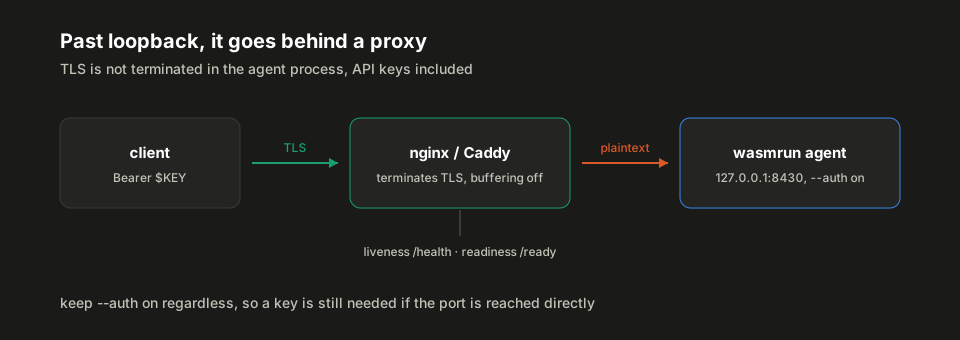
Bind the agent to loopback or a private interface the proxy alone can reach, terminate TLS at the proxy, and keep --auth on anyway so a key is needed even if the port is reached directly. wasmrun agent --host 0.0.0.0 without --auth refuses to start and tells you the three ways forward.
Two proxy settings trip people up and are worth setting before you need them: default response buffering quietly breaks SSE streaming, and a proxy read timeout shorter than your per-exec timeout turns a working long run into a 504.
Size it
| Flag | Default | Turn it down when |
|---|---|---|
--max-concurrent-exec |
100 | Executions are CPU-bound and the host is small |
--workers |
auto (exec cap + 16) | You need to bound thread memory explicitly |
--max-sessions |
100 | Sessions are long-lived and disk is tight |
--max-disk |
100 MB | Per session, and vendored packages count against it |
--max-fuel |
unlimited | You want a hard cap on how many instructions untrusted code can run |
--max-cache-size |
2048 MB | The shared npm cache is competing for disk |
A request that starts an execution holds its worker for the whole run, so a --workers value below --max-concurrent-exec becomes the real limit on concurrency. Watch wasmrun_agent_workers_live and wasmrun_agent_requests_in_flight to see how much of the pool is in use.
SIGTERM, SIGINT and SIGHUP all drain cleanly, in-flight requests get --shutdown-timeout seconds, and every session directory is removed. Give the orchestrator’s stop timeout more room than --shutdown-timeout or it will SIGKILL mid-drain.
What this actually bought
About 140 lines of Python, and the model can compile, run, and iterate on real multi-file TypeScript projects without ever getting near my filesystem. The isolation is not a policy I wrote and hope holds. It is the WASM sandbox boundary, and there is no host shell behind it to escape into.
The two pieces I would carry into any agent like this, whatever the sandbox underneath:
Let the server publish its own tool schemas. Hand-written definitions that mirror somebody else’s API drift out of sync, quietly, and the model is the one who pays for it.
Write down what the schemas cannot say. Every line of that system prompt is a scar. Schemas describe shape. The prompt is where you put behaviour, and it is the only part of this you cannot copy from anyone.
The sandbox itself is worth a look past what this post used. The runnable curl flows in examples/agent-flows/, the full exec surface in docs/docs/agent/, and deployment configs for nginx, Caddy, systemd, Docker and Kubernetes all live in the wasmrun repo:
One last note on the model side. sandbox_agent.py uses claude-opus-5, where adaptive thinking is on by default, so no thinking parameter is needed. It also skips two things a production agent should have: a check for response.stop_reason == "refusal" before reading response.content, and the server-side fallbacks parameter that routes a refused turn to another model. Both are worth adding before this runs unattended.