Lessons from Building an Agent Harness for Local Models
Last updated . Published . · 18 min read
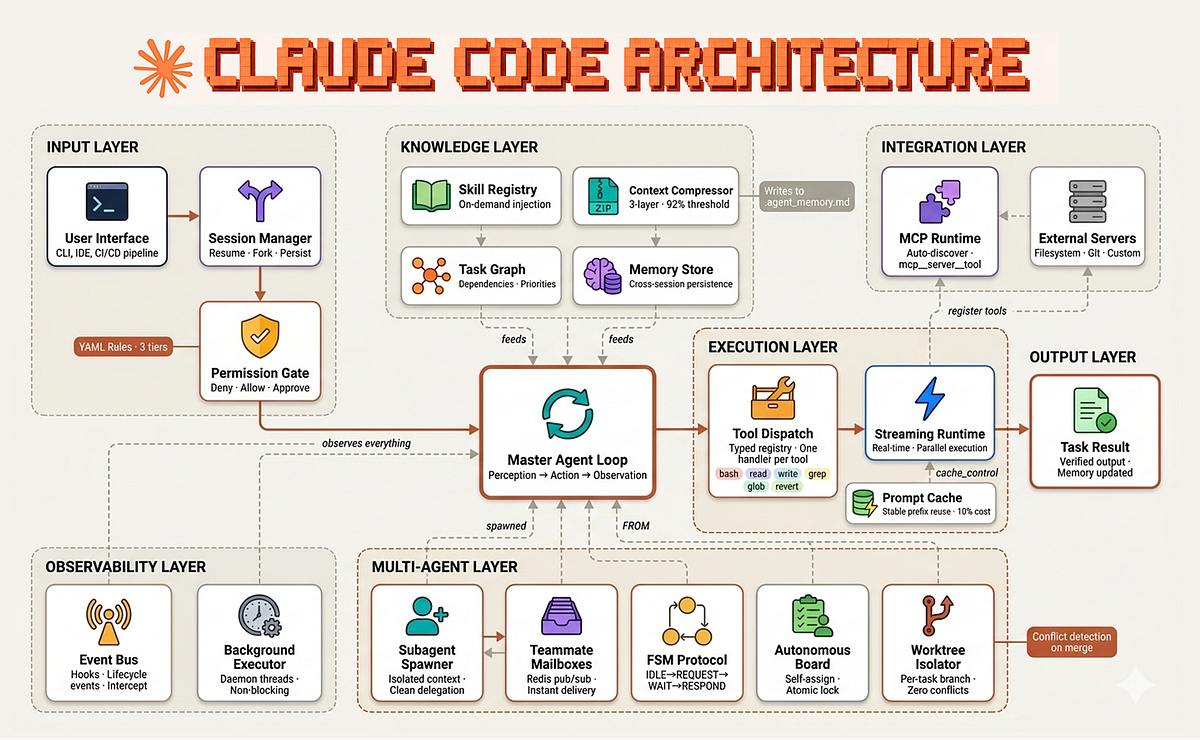
If you have spent real time with a coding agent like Claude Code, opencode, or pi, you have probably noticed something. The model does the visible work, but the thing that makes the whole experience good is not really the model. It is the harness wrapped around it. The loop that keeps the model pointed at the goal, the context that shows up at the right moment, the tools wired in cleanly, the reply streaming back so you can watch it think instead of staring at a spinner. Put a great model behind a sloppy harness and it still feels bad. Put a decent model behind a great harness and it feels sharp.
pi is what made this click for me. It is a coding agent by Mario who’s now joined Earendil, and a lot of what makes it pleasant lives in the harness, not the prompt. Their docs lay the design out far better than I could, and the repo is genuinely worth reading. The same lesson shows up in Claude Code. The model gets the headlines. The harness wins the day to day.
So I wanted one of those. Not for coding, and not sitting on top of a hosted API. I wanted that quality of harness for models running locally, on your own machine, for ordinary everyday use. That is where Orion started…
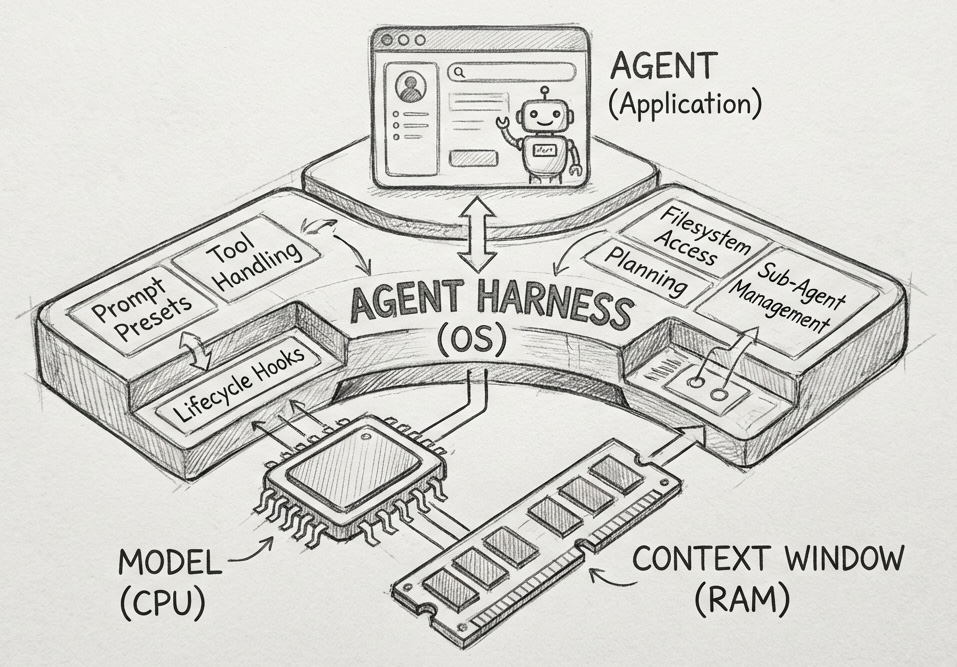
What an agent harness actually is
It helps to picture the thing first. A model on its own is just a network in a box. Capable, but inert. It reads some tokens and predicts the next ones, and that is the whole of it. The harness is everything wrapped around that box: the environment the model acts inside, the thing prompts and tools flow into and that useful behavior flows back out of. It is what the user actually touches. The model never does directly.
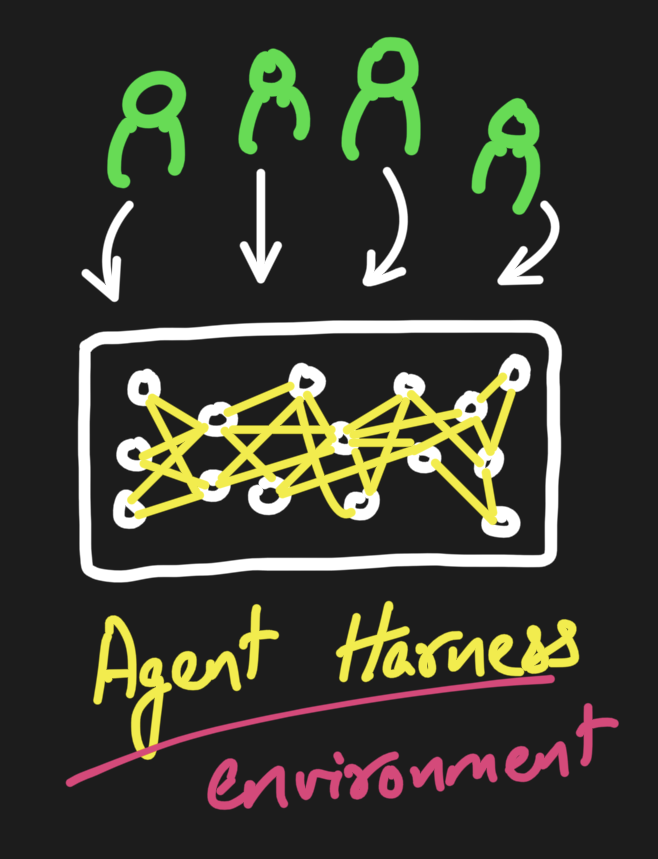
Swap the model and the harness stays. Swap the harness and the whole experience changes. That is why so much of the quality you feel lives here rather than in the weights, and why the layer is worth taking seriously at all.
You do not start at the harness, though. When a model is not doing what you want, you reach for the cheaper levers first, in a rough order.
The first is prompt engineering. Rewrite the system prompt, add a couple of examples, spell out the format you want, fix the tone. It is astonishing how far this gets you, and it is the right first move every time. But it plateaus. Past a point you are just rephrasing the same request and hoping the model reads it more carefully, and it will not.
The next lever is context engineering. The question stops being how you phrase the request and becomes what the model can actually see when it answers: which documents you retrieve, how much history you keep, what order you put it in, what you deliberately leave out. This is where the shape of the window starts to matter, because attention is not uniform across it. There is a smart zone early on, where the model pays close attention, and a dumb zone later as the window fills, where things drift and the middle gets lost. So curating context is not just stuffing in everything relevant. It is compacting the history into a smaller summary, forking a clean branch from a known-good point, or handing off to a fresh session or a sub-agent that carries only what it needs.
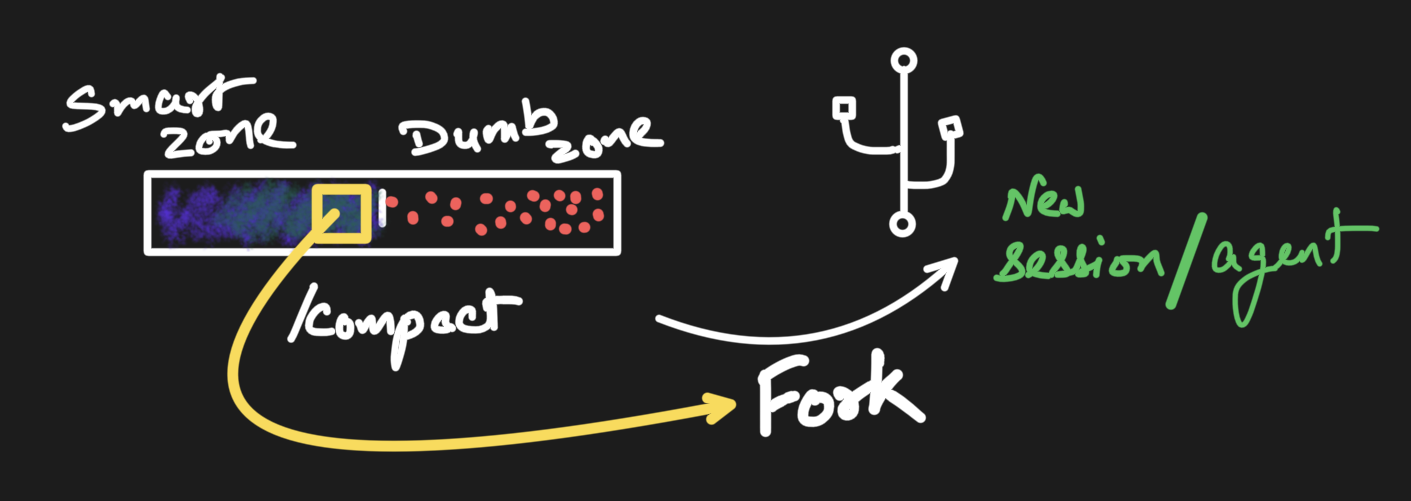
Context engineering is more powerful than prompt engineering, and a lot of real agent quality lives there. But the two share a ceiling. Both assume a single shot: you arrange the input, the model produces its output, and you are done. Plenty of jobs do not fit in one shot. The model needs to call a tool and react to the result, try something and recover when it fails, hold state across many turns, or decide it is not finished and go round again. No amount of prompt wording or context curation expresses that, because none of it is about the input. It is about the loop around the model.
That is harness engineering, and it is what is left when prompting and context have done all they can. How much of that harness you have to build yourself is exactly what changes when you move from a hosted API to a model running on your own machine.
Whether you are building a chat app, a RAG pipeline, or a tool-using agent, the model is only the top of the stack. Underneath sits a layer nobody demos but everybody has to write, and every part of it, prompt formatting, context, streaming, tool calls, gets harder the moment you run models locally instead of calling a hosted API. That gap, between “I called a model” and “I have something I would actually ship,” is the whole job. A lot of how I learned to close it came from reading how pi treats its event stream and its context as a pipeline rather than a pile of strings, then rebuilding those ideas with local inference as the target.
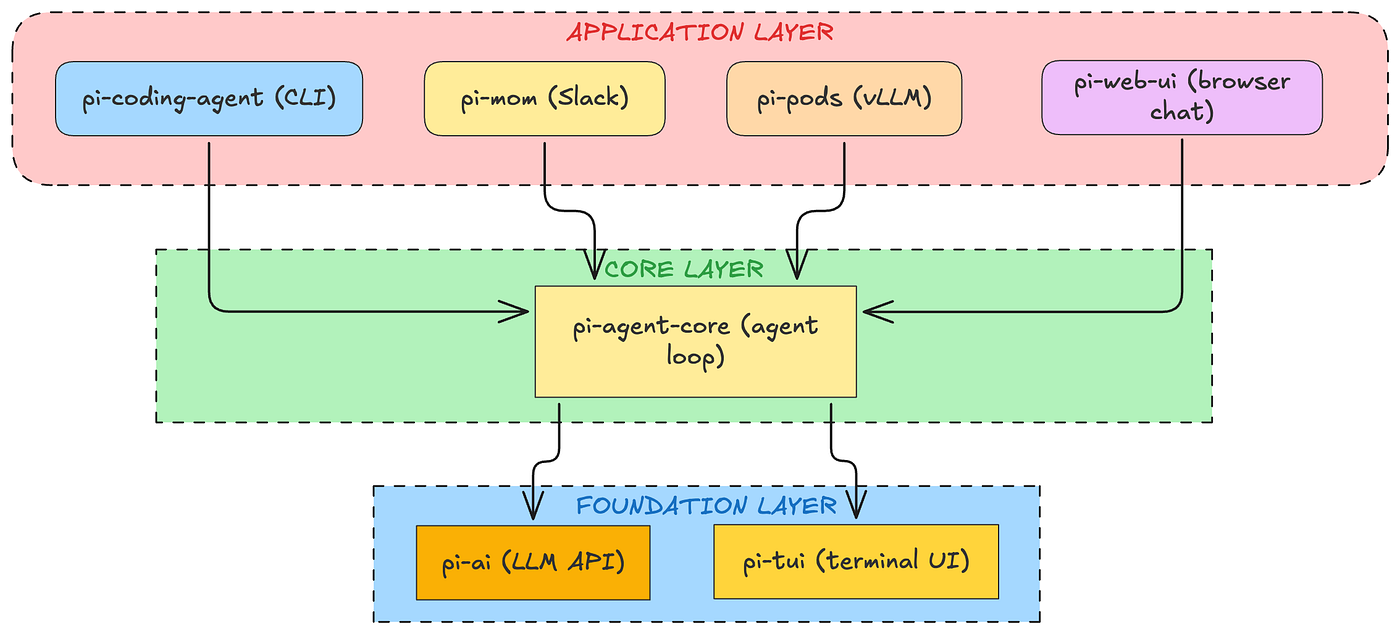
Alejandro also covers this in much more detail: https://alejandro-ao.com/pi-architecture/
What building it actually taught me
Most of the design fell out of problems, not plans. These are the lessons that cost me the most time, roughly in the order I would tell them to anyone else writing a harness for local models.
Prompt formatting is invisible, so it bites hardest
This is the one I underestimated, and it bit me in the most embarrassing way. For a while the harness really only had one template, ChatML, and the detector quietly fell back to it for every model. A Llama 3 or a Mistral would load fine, stream fine, and just answer a little worse, because it was being handed a ChatML-wrapped prompt instead of its own format. Nothing errored. Nothing logged a warning. The logs looked perfect. That is the whole trap with prompt formatting: get it wrong and you do not get a crash, you get a model that seems slightly dumber than it should be, and no thread to pull on.
The fix was to actually read the tokenizer.chat_template baked into the GGUF metadata and match it to the right format, with a manual override for the cases where the metadata is missing or wrong. Llama 3 wants its header blocks. Mistral wants [INST] with the system prompt folded into the first user turn. Gemma, Phi-3, DeepSeek, and Command-R each want something slightly different. The harness now carries templates for ChatML, Llama 3, Llama 2, Mistral and Mixtral, Gemma, Phi-3, DeepSeek, Command-R, Alpaca, and Vicuna, and picks one per model. If you take one thing from this section: spend your time here before you start blaming the weights.
Tool calling, when the model is small
A frontier model follows a tool-call schema obediently. A 3B or 7B running on a laptop does not, and that gap is where most of my debugging went.
It would emit a bare JSON object when I asked for a fenced block. It would wrap the call in a json fence instead of a tool_call one. It would write a sentence of explanation around the JSON. It would get the key names almost right. With a strict parser, every one of those means the tool silently never fires, the model assumes it ran, and the conversation quietly comes apart a few turns later. The failure is the worst kind: nothing crashes, the answer is just wrong.
The fix was to stop being strict. The parser accepts a fenced tool_call block, a plain json block, or even a bare JSON object that is the whole message, as long as it carries a name and arguments. Be liberal in what you accept, because the small model is doing its best. That single change bought more reliability than any amount of prompt wording. Function calling is not a solved checkbox when you leave the frontier models behind. It is a parsing problem, and you should treat it like one.
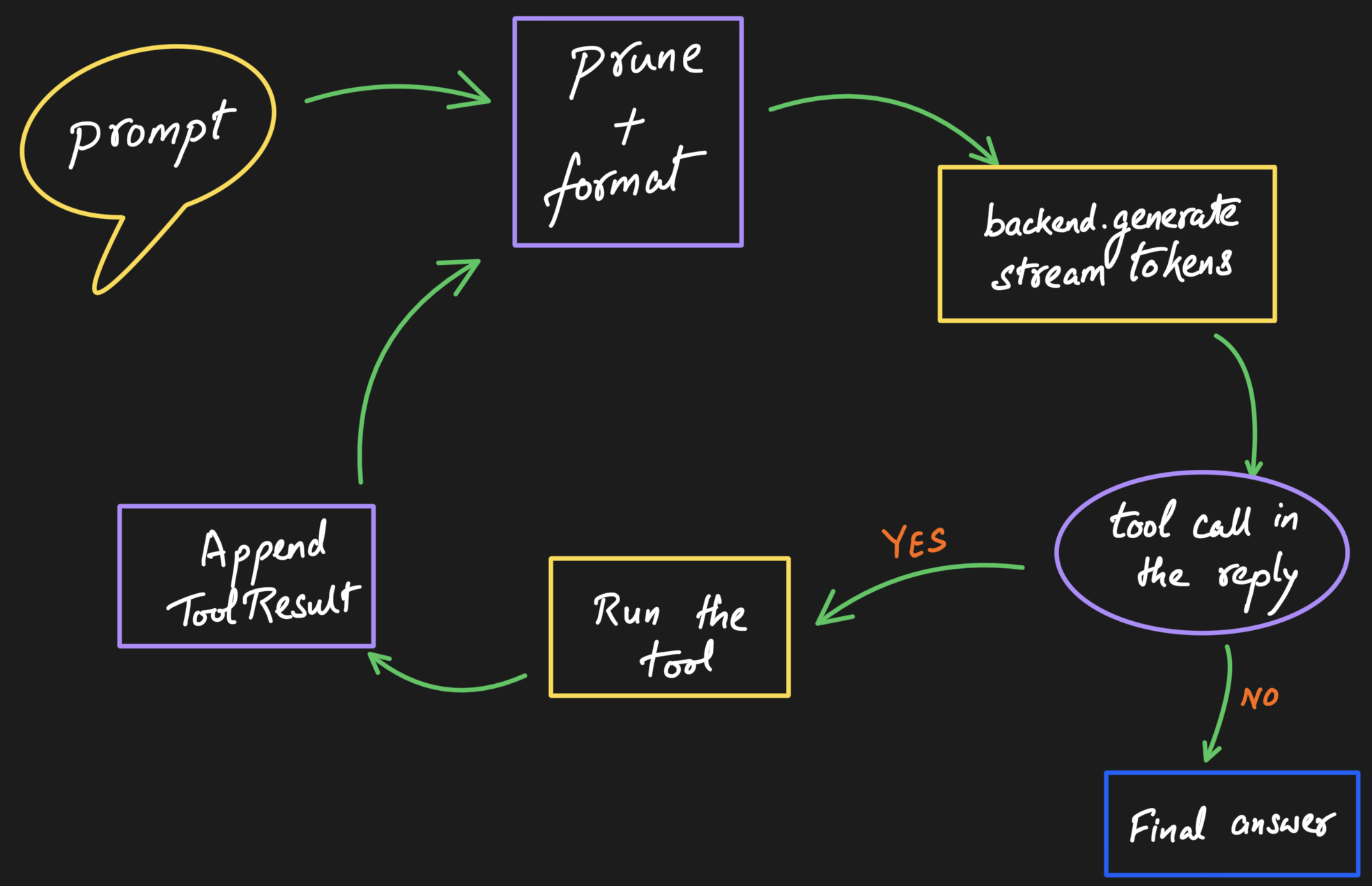
A few details that earned their keep. A JSON array in one reply runs several tools in a turn. The loop is bounded, eight iterations by default, so a model that keeps calling tools eventually gets cut off with a warning instead of spinning forever. And if you register no tools at all, parsing is skipped entirely and replies pass through untouched, so plain chat never pays the tax. In OrionPod the whole thing ships behind a toggle that is off by default, with two harmless built-ins, a clock and a calculator, there to prove the path end to end rather than to do anything clever.
The loop is the heart, and it needs a ceiling
Underneath all of it is one cycle: format the context, ask the model to generate, watch the reply for a tool call, run the matching tool, append the result, and go back to the model, until it returns an answer with no tool call left in it. The only non-obvious part is the ceiling on iterations, so a confused model cannot loop on itself forever.
Context: prune on whole turns, never on loose messages
When the window fills, the easy thing is to drop the oldest messages. The trap is dropping a tool result while keeping the tool call that produced it, which confuses the model badly. So pruning works on whole turns, not individual messages. You can pin a message so it always survives, or fold the oldest turns into a single summary with one extra model call, so their gist sticks around instead of vanishing. This is the boring, careful work that decides whether a long conversation stays coherent or slowly falls apart.
Stream events a UI can render, from day one
People expect to watch tokens appear, so a turn cannot hand you one blob at the end. The first version streamed raw token strings over a single channel, which was enough to make text show up and nothing more. Every UI affordance I wanted next, a live token-budget bar, a little card per tool call, a tokens-per-second read, meant teasing state back out of a flat stream of tokens.
So I tore that out and replaced it with a structured event stream: the turn starts, each token is a delta carrying its own count and speed, a context-budget reading lands after pruning, tools announce their start and end, the turn ends. About a dozen typed events. The UI subscribes and never has to reach inside the harness to work out what is happening. If I were starting over I would design it structured from day one, because retrofitting structure onto a stream of strings is exactly as tedious as it sounds.

Draw one hard seam between the harness and the engine
If I started over, this is the decision I would keep first. There is one clean boundary between the harness and whatever actually generates tokens. On one side, the loop, the context pipeline, the prompt formatting, the tool dispatch. On the other, the model engine, llama.cpp in OrionPod’s case, though it could just as well be MLX, candle, or a hosted API. The harness hands a formatted prompt down and gets tokens back, and never reaches across that line.
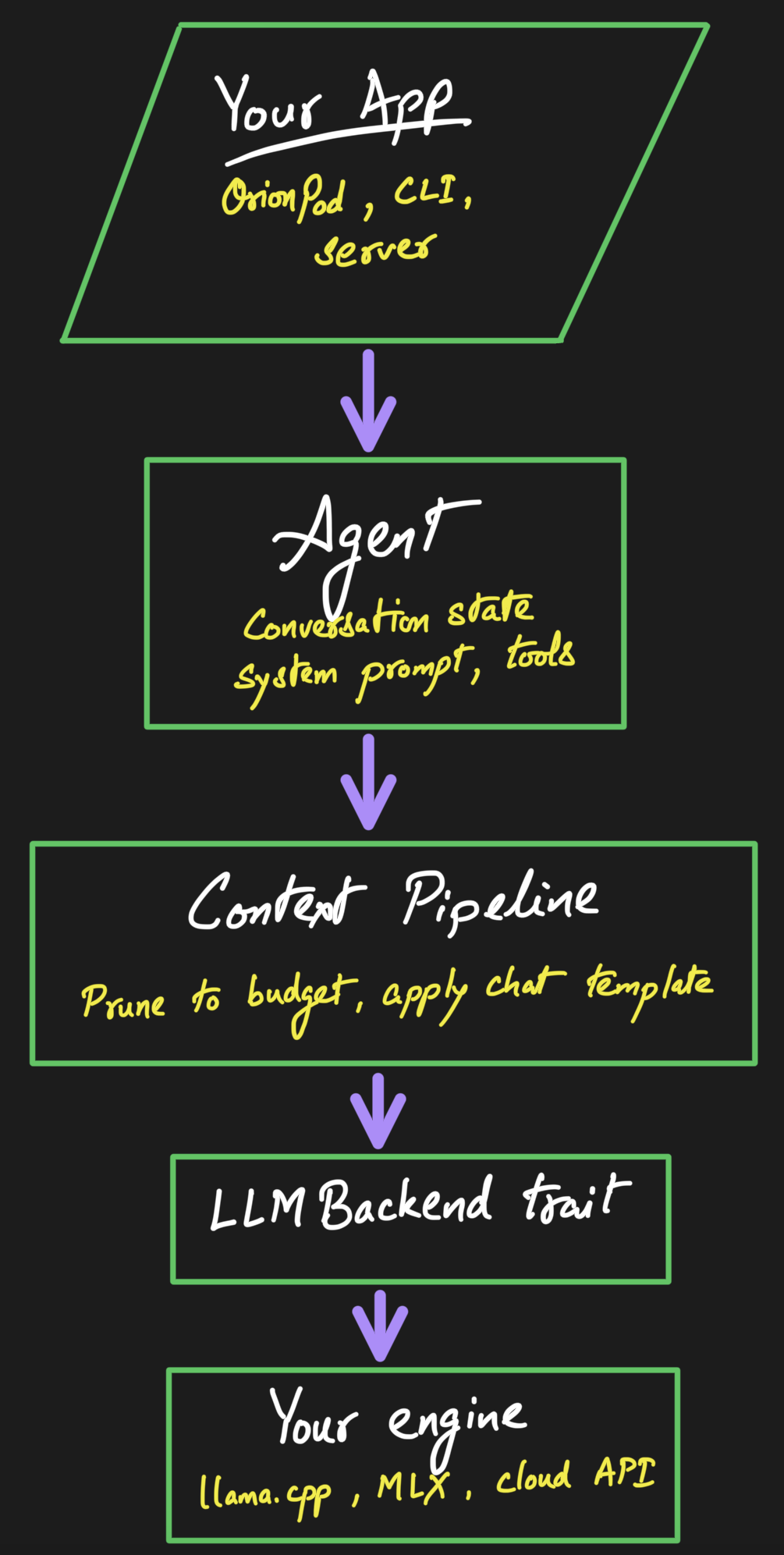
That seam is why swapping the inference engine never touches the loop, and why the same harness can drive a local GGUF or a cloud endpoint without caring which.
The bugs that actually bit
Two of them are worth naming, because they are the kind you do not see coming.
The first was a deadlock. Inference runs on a blocking thread while the rest of the app is async, and at one point I reached for a blocking lock from inside an async task. It passed every quick test and then wedged the whole app solid under real use, because that blocking lock was parking a thread the async runtime still needed. The fix was a few lines. Finding it was not.
The second was about speed, and it lived right on the seam. The engine was rebuilding its inference context on every single turn, throwing away the cached state and re-reading the entire conversation from the top each message. Tens of milliseconds of pure waste that grew with the chat. The fix was to keep the context alive between turns and reuse its cache: compare the new prompt against what the cache already holds, keep the shared prefix, and only process the part that changed. The part I like is that it had to cooperate with the harness. Every time pruning rewrites the older messages, the cache notices the divergence, drops everything from that point, and re-reads only the tail. The clean seam between harness and engine is what made that safe to wire up at all.
Bet on local, and own the consequences
Most agent frameworks worth knowing, LangGraph, CrewAI, and friends, assume a hosted model API. That is a fine assumption for most people. This one makes the opposite bet: the engine is something you load yourself, and the whole context and template machinery is built around models running on your own hardware. Every lesson above is sharper because of that bet. A hosted API hides prompt formatting, hides context limits behind huge windows, and parses tool calls for you. Take those three away and they stop being details. They become the job.
Why building it in Rust paid off
For a harness that lives right next to local inference, Rust genuinely pulled its weight.
- It runs in the same process as the engine. Local inference engines like llama.cpp are native code. The harness is native code too, so it and the model sit in one process with no language boundary, no IPC, and no serialization tax between “format the prompt” and “run the model.” A harness in a managed language has to reach across that boundary on every single turn.
- No garbage collector, so the stream stays smooth. Token streaming is a steady drip of tiny events. A GC pause in the middle of that drip is a visible stutter. Rust has no GC, so latency stays predictable while tokens flow.
- It is frugal with memory. On a laptop, the model weights already claim most of your RAM. The harness should be a rounding error, not another hungry tenant, and a small native library is exactly that.
- Concurrency you can actually trust. A turn runs the engine on a blocking thread while events stream out over a channel and an abort flag can fire at any moment. That is the kind of shared-state concurrency that quietly corrupts data in other languages. Here the compiler simply refuses to let me get it wrong.
- It ships as one thing. It compiles into a static library with no runtime to install, and drops into a Tauri desktop app like OrionPod, a CLI, or a server without dragging a separate runtime along.
- The types carry the contract. Errors are explicit values rather than surprises, and
#[non_exhaustive]enums let the library grow without breaking callers. The compiler doubles as documentation.
None of this makes the project special on its own. Plenty of great software is written in other languages. But for the specific job of wrapping a local model in a responsive agent loop, Rust takes a few genuinely nasty problems off the table. Two in particular: data races between the thread generating tokens and the abort flag trying to cancel it mid-stream, and use-after-free or dangling pointers across the FFI boundary into a C++ engine like llama.cpp. Those are the bugs that show up once in a thousand runs, never on your machine, always on someone else’s, and take a weekend to track down. In Rust they are compile errors instead of production incidents. I would rather argue with the borrow checker for an afternoon than chase a heisenbug like that through a shipped desktop app.
Who this is for, and who it is not
Here is a boundary worth drawing clearly. pi, opencode, and Claude Code are coding agents. They live in your terminal, read and edit files, run commands, and reason about whole repositories. They are excellent at that, and Orion is not trying to beat them at it.
OrionPod is not a coding agent, so Orion is not a coding harness. The aim points the other way: a general-purpose assistant for the everyday person, running on their own machine, private by default. Less “refactor my repo” and more “a capable local mind for whatever an ordinary day throws at you.” Call it an AGI-shaped aspiration if you like, general help for everyone rather than a specialist tool for developers. Coding agents are the sharpest example of what a good harness can do today, so the engineering borrows from them and points it at a broader and, honestly, more ambitious target.
That choice shows up in the defaults. The harness cares about handling a wide spread of open model families out of the box, about staying light enough to run comfortably on a normal laptop, and about a chat-first, tool-optional loop rather than a code-execution-first one. It is a foundation for general local assistants, not a developer tool wearing a chat coat.
What it does not try to be
I want to be honest about the edges. Orion is not LangGraph, and it is not trying to be. There is no graph builder, no vector store, no fifty integrations. If you want a big batteries-included framework, this is not that, and that is fine.
It is also not the only crate in this corner of Rust. rig and kalosm are both worth a look and aim at different things. The niche here is narrow and deliberate: a small, local-first harness that brings a well-behaved loop, sane context handling, and the per-model template grunt work already done.
Small on purpose. That is the whole point.
How OrionPod uses it
OrionPod is the proof that the split is real. The app plugs a llama.cpp engine, with Metal on Apple Silicon, into that single seam, and that is essentially the only harness-specific code in it. Everything else flows from the harness:
- The chat view subscribes to the event stream and renders tokens as they arrive, a little card for each tool call, and a context budget readout.
- The pin button on a message and the “summarize older messages” option in settings are the pinned and summarize strategies, surfaced as UI.
- Switching models switches the chat template under the hood, because the template detection lives in the harness, not in the app.
When I want to improve the agent behavior, I work on Orion. When I want to improve the desktop experience, I work on OrionPod. Keeping those two jobs apart has made both of them calmer to build.
Where this is going
A few things I am poking at, framed honestly as ideas rather than promises:
- MCP. I would like agents to discover tools and resources through the Model Context Protocol instead of having every tool hardcoded. Register them at runtime and let the loop use them.
- More example engines. A first-class MLX example for Apple Silicon, maybe a candle one, to keep proving the engine-agnostic claim beyond llama.cpp.
- A local server on the same loop. An OpenAI-compatible endpoint that reuses the exact same agent, so the thing powering a chat window can also power your scripts.
- Richer tools and composition. More built-ins, and a cleaner story for letting one agent lean on another.
None of that is shipped. But the loop, the seam, the events, and the tool framework that all of it needs already exist, which is the boring half of the work.
It is open source, so go build something
Orion is the harness behind everything above. It is MIT licensed and ships as the orion-core crate; the code, including a runnable mock backend and a streaming OpenAI-compatible example, is on GitHub. If you are writing your own agent for local models and you are tired of re-solving prompt formatting and tool parsing for the third time, you can build on it directly, or just read how it handles them and borrow the ideas.
The docs are on docs.rs and the crate is on crates.io.

And if you would rather just watch it work, download OrionPod and run a model locally. Everything the agent does in that app is Orion doing its job.
I am building this mostly in the open and mostly solo right now, so contributions, sharp issues, new engine examples, and template fixes for model families I have not covered yet are all very welcome.
💬 If you want to talk it through, there is a Discord. The nullorder Discord is where I hang around and ramble about OrionPod, Orion, and whatever else is half-built that week. Come kick ideas around, ask questions, or just lurk.
🐦 And for the lighter, more regular updates, follow OrionPod on X.
Bring your own model. I will handle the loop.